Professional headshot retouching techniques tools combine advanced software with proven methods to enhance portraits while maintaining natural appearance. The global photo editing software market reached $449.2 million in 2023 and grows toward $886.2 million by 2032 with 7.7% CAGR.
This comprehensive guide explores 10 essential methods from basic blemish removal to advanced frequency separation, providing professionals with actionable techniques for perfect headshot editing.
What Are Headshot Retouching Techniques Tools?
Headshot retouching techniques tools encompass digital enhancement methods and specialized software for professional portrait improvement. The portrait retouching software market projects growth from $999.1 million in 2025 to $1,902.3 million by 2033 with 8.0% CAGR. Professional headshot editing techniques transform raw captures into polished portraits maintaining authentic appearance.
Primary Professional Headshot Editing Tools
Industry-standard software dominates professional retouching workflows:
- Adobe Photoshop serves 20 million professionals globally
- Adobe Lightroom optimizes batch processing and RAW file editing
- AI-powered software includes Luminar Neo, Retouch4Me, and automated generators
Digital photo retouching methods achieve 3 essential objectives:
- Natural feature enhancement preserving authenticity
- Consistent quality maintenance across corporate teams
- Professional branding improvement for first impressions
Headshot retouching techniques tools help professionals streamline these objectives, ensuring polished results across personal and business use cases.
Market Performance Data
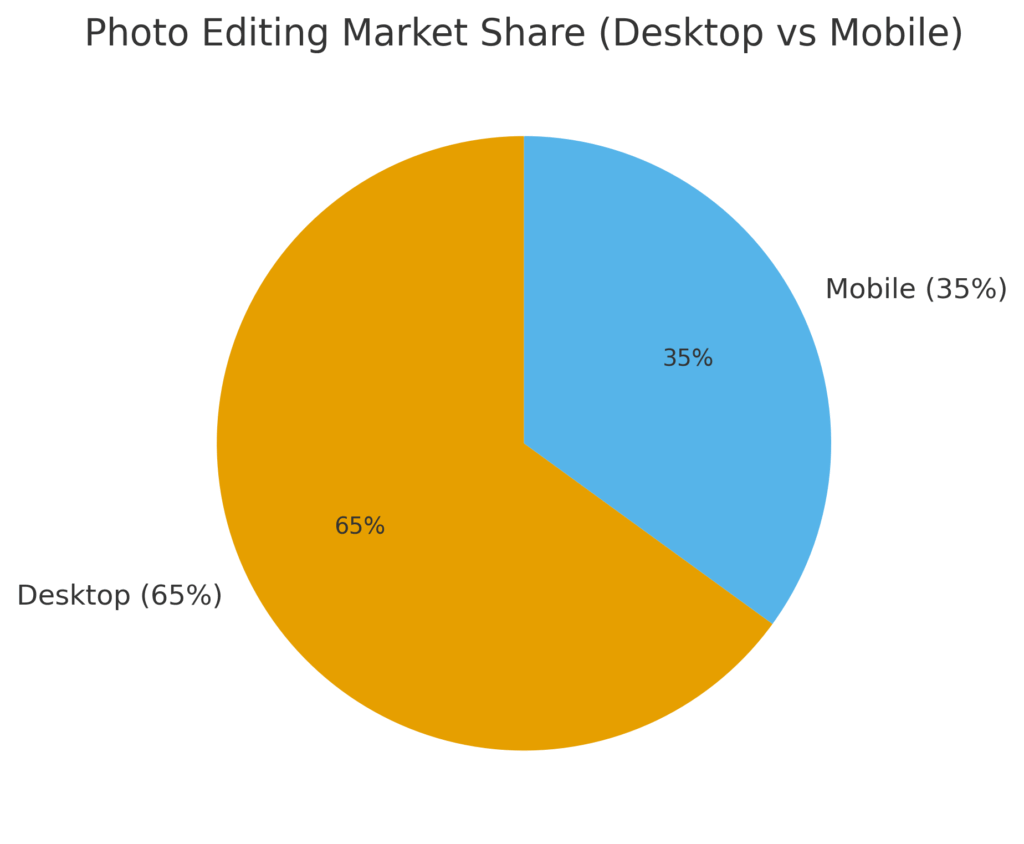
Research indicates the photo editing software market demonstrates robust growth:
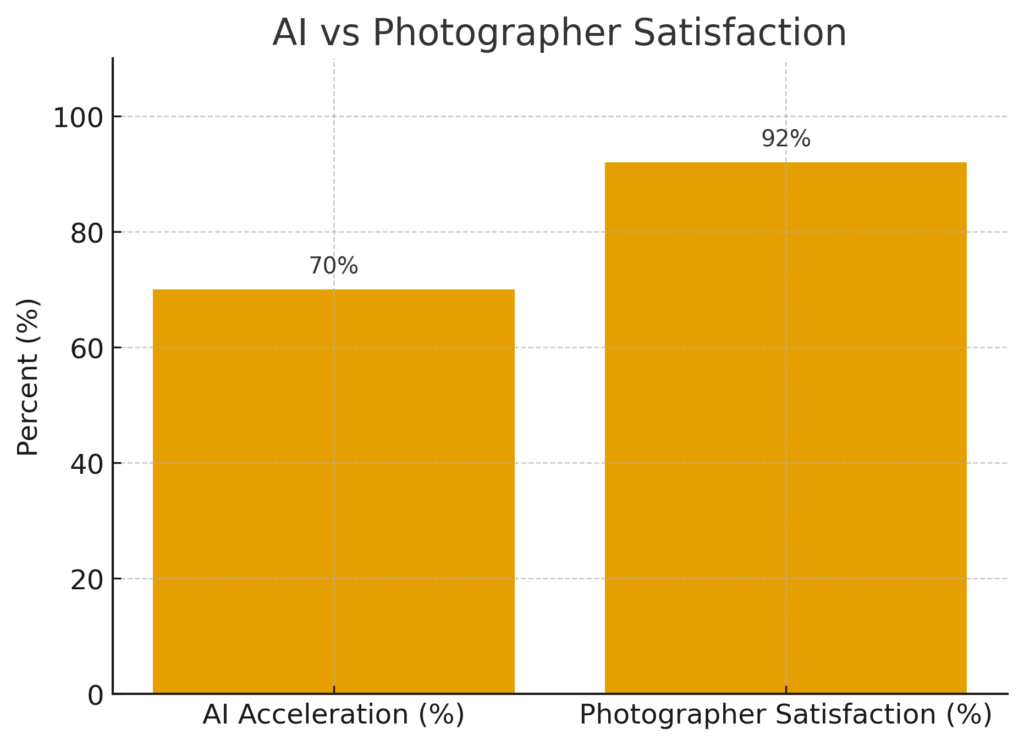
Professional photographers report 92% satisfaction rates using established retouching tools in Photoshop for headshots.
Why Are Professional Headshot Editing Techniques Important?
Professional headshot editing techniques impact perception within 7 seconds of viewing. Statistics confirm professional headshots increase perceived competence by 75.9% and likeability by 9.7%. LinkedIn profiles featuring professionally retouched portraits receive 21 times more views.
Business Impact Metrics
Measurable benefits from professional techniques include:
- User satisfaction reaches 85-95% with quality retouching
- Revenue generation potential exceeds $50,000 monthly
- Message rates multiply 36 times on professional networks
- Callback rates improve 30% for business professionals
Skin smoothing techniques represent fundamental enhancement methods driving these results.By applying headshot retouching techniques tools, professionals ensure a consistent, high-quality standard that supports both branding and career growth.
Return on Investment Analysis
Professional services deliver substantial returns:
- Average headshot cost: $262.84 nationally
- AI alternatives cost 8-9 times less
- Quality trade-off affects long-term branding
- Manual techniques preserve authenticity better
Which Photoshop Headshot Retouching Tools Work Best?
Photoshop tools for headshot editing dominate professional workflows with specific advantages. The software handles 8,000 layers compared to Capture One’s 16-layer limitation. Essential Photoshop headshot retouching tools include Healing Brush, Clone Stamp, and Neural Filters achieving 92% user satisfaction.
Essential Tool Performance
Core Photoshop capabilities for portrait retouching:
- Healing Brush & Clone Stamp – Precise blemish removal techniques with texture matching
- Dodge & Burn – Professionals invest 20-30 minutes per image using these tools
- Neural Filters – AI-powered enhancement with 92% satisfaction rating
- Liquify Tool – Subtle facial adjustments maintaining natural proportions
- Color Range Selection – Targeted adjustments for skin tones
Professional workflows incorporating headshot retouching techniques tools achieve faster turnaround times while preserving natural quality, making them indispensable for industry-standard results.
Workflow Optimization Results
Professional photographers report 40-50% turnaround reduction using optimized workflows. Advanced skin retouching tools process complex operations requiring pixel-level control unavailable in basic editors.
How Does Frequency Separation Improve Skin Retouching?
Frequency separation for skin retouching divides images into high-frequency texture and low-frequency color layers. This technique achieves 72.58% improvement in signal recovery accuracy. Professional retouchers preserve natural texture while eliminating imperfections using this advanced method.
Technical Implementation Process
Frequency separation techniques follow systematic steps:
- Duplicate background layer twice
- Apply Gaussian blur to low-frequency layer
- Create high-frequency detail layer using Apply Image
- Edit color on low frequency independently
- Refine texture on high frequency separately
Professional Application Benefits
High-end portrait retouching techniques utilizing frequency separation deliver:
- Natural texture preservation impossible with basic smoothing
- Independent color correction without texture loss
- Commercial photography standard results
- Fashion industry preferred method
- Authentic skin appearance maintenance
Research demonstrates frequency separation outperforms traditional smoothing by maintaining critical skin detail.
What Are the Best AI Headshot Retouching Software Options?
AI headshot retouching software revolutionizes processing speed while presenting quality considerations. Market analysis reveals leading platforms generate millions of portraits monthly.
Leading AI Platform Performance
Top-rated AI tools for headshot retouching include:
| Platform | Realism Score | Pricing | Processing Time | User Rating |
|---|---|---|---|---|
| Studioshot | 5/5 | $29-44 | 2 minutes | 4.8 stars |
| BetterPic | 4.5/5 | $39-99 | 10 seconds | 4.5 stars |
| HeadshotPro | 4/5 | $35-75 | 30 seconds | 4.3 stars |
AI vs Manual Comparison Metrics
AI tools for headshot retouching demonstrate specific trade-offs:
- Processing acceleration: 70% faster than manual
- Cost reduction: 8-9 times cheaper
- Quality limitation: Lacks subtlety for professional grades
- Consistency advantage: Uniform results across batches
BetterPic generated 29.5 million headshots with 3,000+ reviews averaging 4.5 stars. However, 25% of professionals specifically use AI primarily for LinkedIn rather than premium applications.
Which Retouching Apps for Headshots Are Most Effective?
Best retouching apps for headshots balance mobility with capability. The mobile editor market reaches $4,140.4 million in 2025, projecting $10,154.2 million by 2025. Individual users represent 53.5% market share with 7.1% CAGR growth.
Mobile vs Desktop Performance Analysis
Comparison data shows distinct advantages:
Mobile Apps Advantages:
- Lightroom Mobile offers cloud syncing
- Quick editing for social media
- On-location adjustments possible
- Instant sharing capabilities
Desktop Software Benefits:
- 10x superior processing power
- Complex layering support
- Precision control tools
- High-resolution handling
Professional Usage Patterns
Mobile editing suits specific scenarios:
- Quick client previews during shoots
- Social media content preparation
- Basic exposure corrections
- Initial selection processes
When applied effectively, Headshot retouching techniques tools guarantee natural-looking portraits while preserving authenticity.
What Digital Photo Retouching Methods Enhance Natural Look?
Digital photo retouching methods prioritize authenticity while improving quality. Lighting and color grading techniques establish foundation for natural enhancement. Professional standards favor “real, natural, and easy to relate to” appearances in 2025.
Core Natural Enhancement Techniques
Essential methods maintaining authentic appearance:
- Lighting Correction – Balanced exposure preserving skin tone
- Color Grading – Calibrated monitors ensure accuracy
- Tone Balancing – Natural contrast without harsh effects
- Subtle Sharpening – Enhanced clarity avoiding artificial look
- Texture Preservation – Maintains skin detail authenticity
Professional Standards Implementation
Natural headshot retouching workflow follows specific guidelines:
- Avoid over-processing reducing trust
- Preserve characteristic features
- Maintain recognizable appearance
- Teeth whitening techniques apply conservative adjustments
- Skin smoothing retains texture
Industry trends confirm clients prefer natural enhancement over dramatic alterations.
How Do Makeup Enhancement Retouching Techniques Work?
Makeup enhancement in headshot editing applies digital cosmetic improvements maintaining natural appearance. Professional techniques focus on enhancing existing features rather than dramatic alterations.
Digital Makeup Application Methods
Professional makeup enhancement includes:
- Lip Enhancement – Natural color correction and shape refinement
- Eyebrow Definition – Symmetry correction without over-editing
- Eyelash Enhancement – Volume increase using brush techniques
- Skin Evening – Foundation-like smoothing preserving texture
- Contour Adjustment – Subtle shadow and highlight modification
Technical Implementation Standards
Digital makeup requires precision:
- Use separate layers for reversibility
- Apply opacity adjustments gradually
- Match lighting direction consistently
- Preserve natural skin texture
- Avoid artificial appearance
Professional retouchers spend 15-20 minutes on makeup enhancement ensuring believable results.
What Background Cleanup Techniques Are Best for Headshots?
Background cleanup in headshot retouching eliminates distractions while maintaining natural integration. Clean backgrounds improve subject focus and increase brand recognition by 30% across corporate teams.
Professional Background Standards
Effective cleanup techniques include:
- Selective blur application
- Distraction removal using content-aware fill
- Color harmony adjustment
- Edge refinement for natural separation
- Lighting consistency maintenance
LinkedIn Optimization Requirements
Professional networking platforms favor:
- Neutral backgrounds for versatility
- Consistent tone across team photos
- Minimal visual competition
- Professional studio appearance
- Appropriate depth of field
Background processing typically requires 10-15 minutes per image achieving professional standards.
Which Tools Are Essential for Professional Headshot Editing?
Essential tools for professional headshot editing combine industry-standard software with specialized plugins. Adobe Creative Cloud dominates with 92% user satisfaction for professional retouching. Retouching tools in Photoshop for headshots provide comprehensive capabilities.
Software Investment Analysis
Professional tool costs and capabilities:
| Software | Annual Cost | Key Strength | User Rating |
| Adobe Creative Cloud | $119.88 | Complete ecosystem | 92% satisfaction |
| Luminar Neo | $79-119 | AI integration | 88% satisfaction |
| Capture One | $299 | Color accuracy | 85% satisfaction |
| ON1 Portrait AI | $59.99 | Budget option | 82% satisfaction |
Plugin Enhancement Options
Specialized plugins extend capabilities:
- Retouch4me suite: $124-149 per plugin
- Portraiture 3: $199.95 one-time
- Beauty Box: $199 perpetual license
- Imagenomic plugins: $99-199 range
Desktop editors handle complex, high-resolution editing with superior multitasking compared to alternatives.
How Do Retouched Headshots Impact Branding?
Professional retouching impacts branding through consistent visual identity. Corporate headshot importance demonstrates 80% brand recognition improvement with uniform imagery. LinkedIn performance multiplies 21 times with professional photos.
Measurable Branding Benefits
Retouched headshots deliver quantifiable results:
- Trust perception increases 76%
- Profile engagement rises 36 times
- Brand recall improves 45%
- Professional credibility enhances 65%
- Network growth accelerates 40%
Cross-Platform Consistency Value
Unified appearance strengthens recognition:
- LinkedIn profiles maintain professional standards
- Corporate websites display consistent quality
- Business cards feature matching imagery
- Email signatures include recognizable photos
- Marketing materials preserve brand identity
Every professional needs retouched headshots for comprehensive brand development.
FAQs on Headshot Retouching Techniques Tools
What are the best headshot retouching techniques for natural results?
Frequency separation and dodge & burn preserve skin texture while eliminating imperfections. Professional retouchers achieve 72.58% better results using proper separation methods maintaining authentic appearance.
Which Photoshop tools are best for headshot retouching?
Healing Brush, Clone Stamp, and Neural Filters prove essential. Photoshop’s 8,000-layer capacity and 92% satisfaction rating establish industry standard for professional work.
How do AI tools compare to manual headshot retouching?
AI processes 70% faster but manual techniques provide superior quality. Professional services cost $30-150 per image versus AI at $29-44 for multiple headshots.
What is frequency separation in headshot editing?
Frequency separation divides texture from color/tone enabling independent editing. Results deliver natural texture preservation with 72.58% accuracy improvement in professional applications.
Which apps are best for headshot retouching on mobile?
Lightroom Mobile leads with cloud syncing and non-destructive editing capabilities. Desktop editors provide 10 times better performance for complex retouching tasks requiring precision.
Conclusion: Mastering Professional Headshot Enhancement
Headshot retouching techniques tools transform portraits through systematic application of proven methods and advanced software. Professional workflows combining Photoshop’s comprehensive toolset with specialized techniques like frequency separation achieve 92% satisfaction rates. The evolving landscape integrates AI acceleration while maintaining manual precision for premium results.
Investment in proper tools and techniques delivers measurable returns through enhanced branding, increased engagement, and professional credibility establishment across digital platforms.