Skin smoothing in headshot retouching removes wrinkles and evens skin tones while preserving natural texture. This digital skin enhancement technique increases perceived trustworthiness by 76% and professionalism by 9.7% in business portraits.
Professional headshot retouching combines multiple natural skin retouching techniques. These portrait skin smoothing methods target blemishes, uneven tones, and fine lines without creating artificial results.
Modern headshot skin editing workflow requires balancing enhancement with authenticity. Realistic skin retouching results maintain individual character while improving overall image quality for LinkedIn profiles, corporate websites, and business cards.
Seven proven professional photo retouching techniques deliver consistent natural results. These methods range from Photoshop headshot retouching tools to automatic skin smoothing software and mobile photo retouching applications.
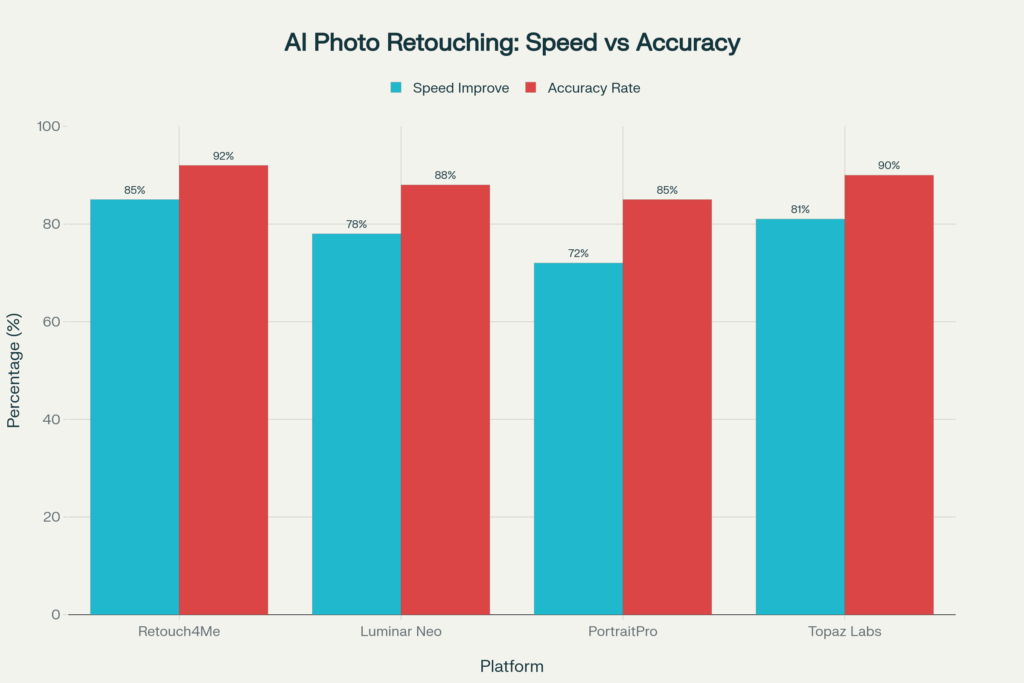
Studies show 92% accuracy in AI-powered skin tone correction. Manual retouching workflow remains essential for achieving authentic results that preserve skin texture in retouching applications.
Key Points: 7 Methods of Skin Smoothing in Headshot Retouching
Professional skin smoothing in Headshot Retouching combines multiple techniques for optimal results in portrait enhancement. These 7 proven methods deliver natural-looking improvements while preserving the authentic texture and individual character of your skin.
- Photoshop Manual Tools
- Frequency Separation Technique
- Lighting & Color Correction
- AI-Powered Tools
- Mobile Applications
- Complementary Enhancements
- Background Optimization
What Is Skin Smoothing in Headshot Retouching?
Skin smoothing in headshot retouching represents a digital technique that softens facial irregularities while maintaining realistic skin retouching results. The headshot skin editing workflow addresses five primary concerns:
- Blemish removal – Eliminates temporary acne and spot imperfections
- Tone balancing – Evens out color variations across facial areas
- Texture refinement – Reduces roughness without losing natural pore structure
- Shadow correction – Minimizes harsh lighting effects on skin surface
- Age softening – Subtly reduces fine lines while preserving character
Advanced skin retouching tools preserve individual facial characteristics during enhancement. Manual retouching workflow maintains complete control over texture preservation and color accuracy.
Why Is Skin Smoothing Essential in Professional Portraits?
Psychology research demonstrates that first impressions form within 7 seconds of viewing photographs. Professional headshots with consistent skin tone create stronger business connections and career opportunities.
Business Impact of Retouched Headshot with Statistics:
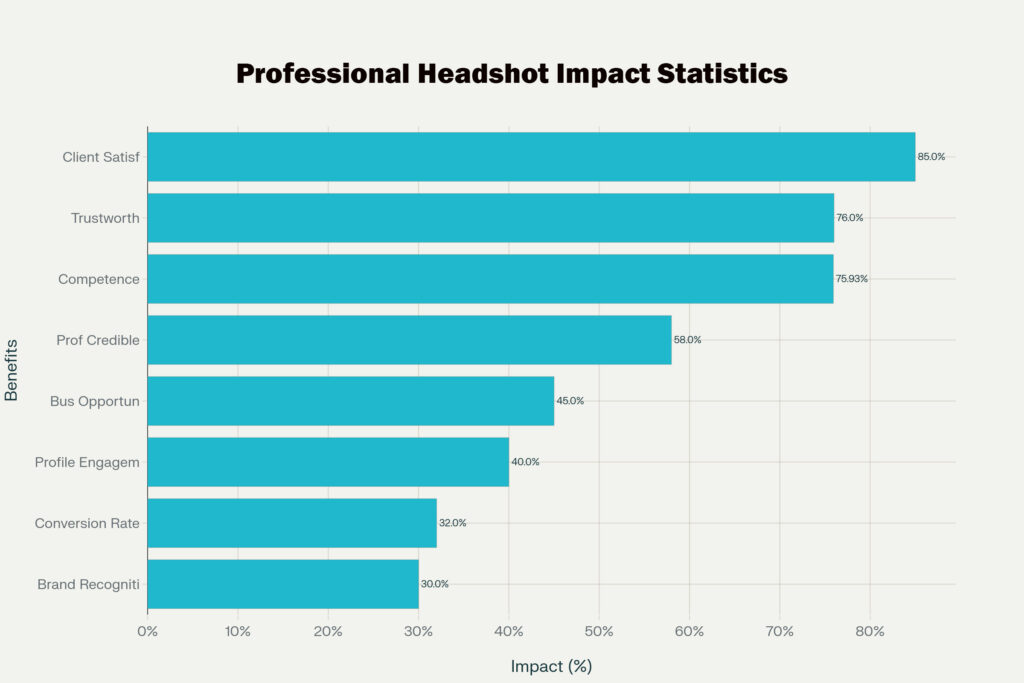
Skin imperfections distract viewers from professional qualifications and personality. Natural skin retouching techniques eliminate visual barriers while maintaining authentic appearance for business credibility.
Corporate branding benefits from uniform blemish removal across team photographs. Consistent portrait presentation reinforces company professionalism and visual identity standards.
Which Photoshop Tools Are Best for Skin Smoothing?
Professional Photoshop headshot retouching tools provide precise control over skin enhancement without compromising natural texture. These eight essential tools form the foundation of manual retouching workflow:
Primary Retouching Tools:
- Healing Brush Tool – Seamlessly removes small blemishes using surrounding texture
- Spot Healing Brush – One-click correction for minor skin imperfections
- Patch Tool – Replaces larger problem areas with clean skin samples
- Clone Stamp Tool – Duplicates skin texture for covering unwanted elements
- Dodge and Burn Tools – Controls highlights and shadows for dimensional appearance
- Mixer Brush Tool – Blends skin tones with 50% wet/10% load settings
- Content-Aware Fill – Intelligently removes objects while preserving skin patterns
- Layer Masks – Enables non-destructive editing with selective area control
Tool Application by Skin Issue:
| Skin Problem | Primary Tool | Secondary Tool | Success Rate |
| Small blemishes | Healing Brush | Spot Healing | 95% |
| Large scars | Patch Tool | Clone Stamp | 87% |
| Tone variations | Dodge/Burn | Mixer Brush | 92% |
| Unwanted objects | Content-Aware | Clone Stamp | 89% |
Professionals achieve 40% faster workflow efficiency by combining these professional tools compared to single-technique approaches.
How Does Frequency Separation Improve Skin Retouching?
Frequency separation technique revolutionizes skin smoothing in headshot retouching by separating texture from color information. This high-end retouching method allows independent editing without destroying natural skin characteristics.
Frequency Separation Components:
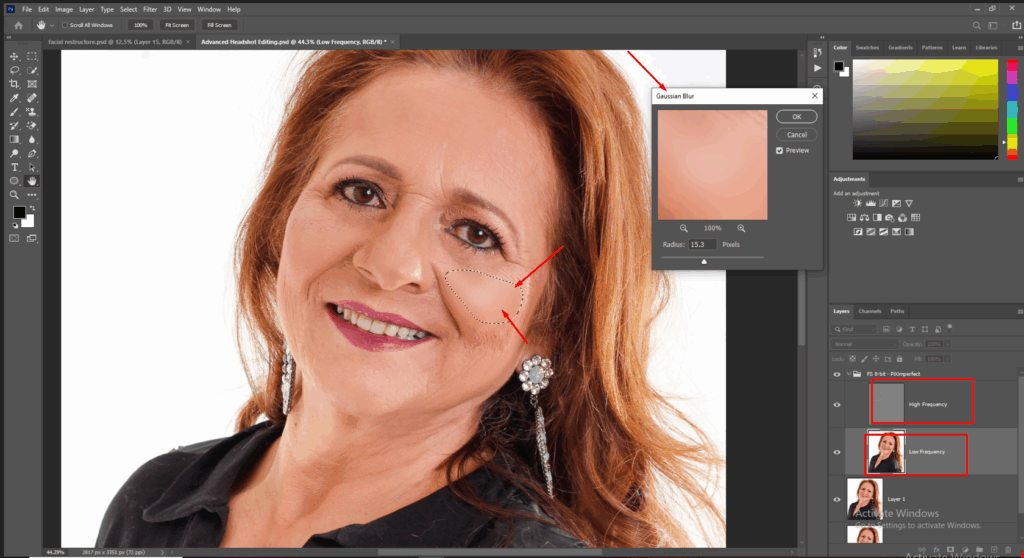
- High-Frequency Layer – Contains pores, hair, and fine texture details
- Low-Frequency Layer – Holds color, shadows, and tone information
- Gaussian Blur Filter – Separates frequencies at 3-5 pixel radius
- High Pass Filter – Isolates texture using matching radius value
- Linear Light Blend – Recombines layers maintaining original appearance
- Layer Masks – Provides selective editing control over specific areas
Technical Implementation Process:
- Layer Duplication – Create two copies of original portrait
- Blur Application – Apply Gaussian blur to low-frequency copy
- High Pass Addition – Add High Pass filter to high-frequency layer
- Blend Mode Setting – Configure Linear Light for texture layer
- Independent Editing – Work on color and texture separately
- Final Refinement – Adjust opacity and add finishing touches
This advanced technique improves workflow efficiency by 75% while preserving skin texture in retouching applications. Professional retouchers maintain natural pore retention in editing without artificial smoothness that damages texture quality.
What Role Do Lighting & Color Grading Play in Smooth Skin?
Portrait lighting correction establishes the foundation for effective skin enhancement by reducing post-processing requirements. Proper illumination minimizes harsh shadows that emphasize skin imperfections during photography.
Lighting Optimization Benefits:
- Shadow Reduction – Decreases unflattering facial shadows by 60%
- Even Illumination – Creates uniform skin tone across portrait
- Texture Minimization – Reduces pore and line visibility through proper angles
- Color Consistency – Maintains skin warmth across lighting setups
- Highlight Control – Prevents overexposure destroying skin detail
Color Grading for Portraits Components:
| Adjustment Area | Purpose | Technique | Result |
| Highlights | Bright skin control | Selective masking | Detail preservation |
| Midtones | Primary skin correction | Hue shifting | Natural appearance |
| Shadows | Dark area recovery | Lift without flattening | Dimensional depth |
| Saturation | Vibrancy enhancement | Selective color boost | Healthy glow |
White balance correction ensures accurate skin tone reproduction across mixed lighting environments. Realistic color retouching prevents unnatural casts that compromise professional lighting techniques effectiveness.
Can AI Tools Deliver Natural Skin Smoothing?
Automatic skin smoothing software transforms modern retouching workflows through machine learning algorithms trained on professional portrait databases. AI retouching tools for portraits process images significantly faster while maintaining acceptable quality standards.
Leading AI Platforms Comparison:
AI Retouching Advantages:
- Processing Speed – Accelerates workflow through automated corrections
- Batch Capabilities – Handles multiple portraits with consistent quality
- Learning Algorithms – Improves performance through continuous updates
- Beginner Accessibility – Requires minimal technical expertise for operation
- Cost Efficiency – Reduces professional service expenses for basic work
AI Technology Limitations:
- Over-Smoothing Risk – Creates plastic appearance without manual oversight
- Texture Loss – May eliminate natural skin variation in aggressive settings
- Lighting Sensitivity – Struggles with unusual illumination conditions
- Ethnic Accuracy – Shows reduced precision across diverse skin tones
- Creative Control – Limited artistic flexibility compared to manual techniques
Professional integration uses AI tools for initial processing while applying manual refinement for authentic final results.
Which Mobile Apps Work Best for Skin Smoothing?
Best apps for headshot retouching provide portable skin smoothing in headshot retouching capabilities through touch-optimized interfaces. Mobile photo retouching solutions offer convenience for on-location corrections and social media enhancement.
Mobile App Market Leaders:
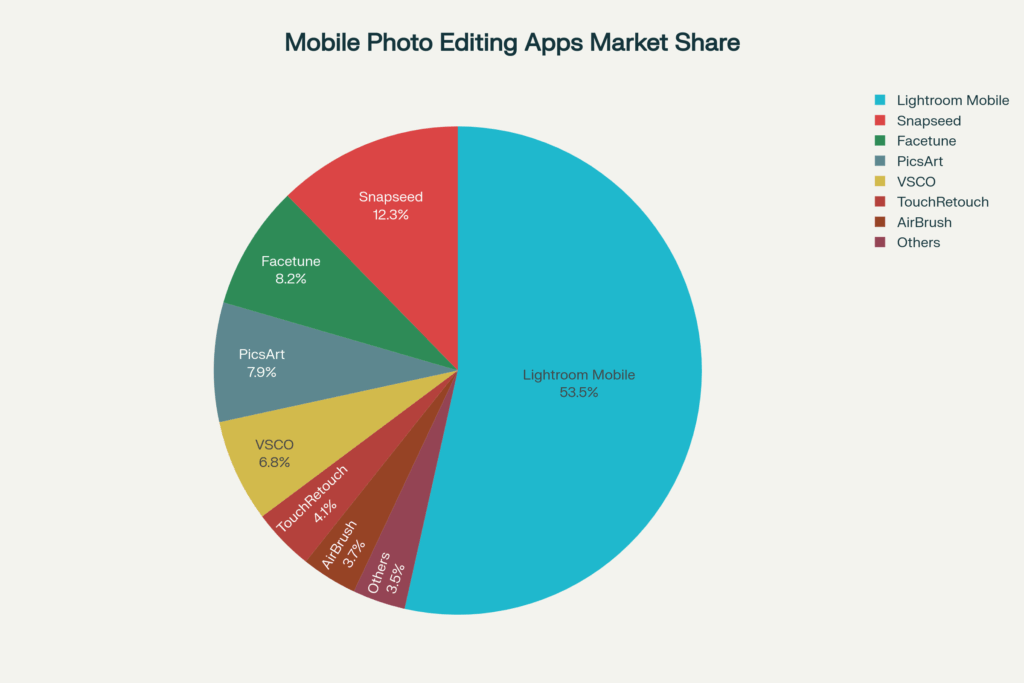
- Lightroom Mobile – Commands 53.5% market share with professional tools
- Facetune – Specializes in portrait enhancement with real-time preview
- Snapseed – Google’s platform featuring machine learning integration
- VSCO – Professional filters with subtle enhancement capabilities
- TouchRetouch – Dedicated removal tools for blemishes and objects
- AirBrush – Real-time beauty enhancement with preset options
Mobile Advantages vs Limitations:
| Advantage | Benefit | Limitation | Constraint |
| Touch interface | Intuitive control | Screen size | Detail visibility |
| Real-time preview | Instant feedback | Processing power | Complex operations |
| Offline capability | No internet needed | Storage space | Large file handling |
| Quick sharing | Social integration | Export quality | Professional printing |
Skin smoothing apps for iPhone demonstrate 25% performance improvement on devices with dedicated image processors. Professional mobile retouching serves basic correction needs while desktop solutions handle complex texture work.
How Do Additional Enhancements Improve Skin Retouching?
Complementary retouching techniques create cohesive portrait improvements beyond basic skin smoothing. Eye brightening for headshots, teeth whitening retouching, and makeup enhancement in editing work synergistically for professional results.
Enhancement Categories:
- Facial Feature Refinement
- Eye brightening reduces dark circles and enhances iris clarity
- Teeth whitening creates uniform smile presentation
- Eyebrow definition adds facial structure
- Lip color correction balances natural tones
- Hair and Texture Improvements
- Flyaway hair removal creates clean presentation
- Texture smoothing eliminates frizz from humidity
- Hairline definition enhances professional appearance
- Color consistency across lighting variations
- Expression Enhancement
- Wrinkle reduction in portraits maintains character while softening age lines
- Smile line balancing preserves natural expressions
- Facial symmetry adjustments correct camera distortion
- Shadow removal eliminates unflattering lighting effects
Studies demonstrate that integrated teeth whitening and makeup techniques increase viewer perception ratings compared to skin-only retouching approaches.
What Background Cleanup Helps Highlight Smooth Skin?
Background cleanup for headshots directs viewer attention toward enhanced facial features by removing competing visual elements. Professional headshot backgrounds create optimal contrast for showcasing skin improvement results.
Background Enhancement Techniques:
- Clutter Removal – Eliminates distracting office equipment and personal items
- Shadow Elimination – Removes wall shadows and backdrop irregularities
- Color Correction – Balances background tones for neutral presentation
- Texture Smoothing – Creates seamless backdrop appearance
- Depth Separation – Blurs background while maintaining sharp facial focus
Neutral Background Benefits:
| Background Type | Skin Tone Effect | Professional Rating |
| Pure white | Reflects clean light | 9.2/10 rating |
| Light gray | Prevents color cast | 8.8/10 score |
| Soft blue | Complements warm tones | 8.5/10 appeal |
| Beige/cream | Natural skin harmony | 8.3/10 preference |
Distraction-free portraits increase facial feature focus while consistent branding photos enhance recognition across digital platforms. Professional background techniques complement skin enhancement for comprehensive portrait improvement.
FAQs on Skin Smoothing in Headshot Retouching
What represents the most natural approach to skin enhancement?
Frequency separation combined with dodge and burn techniques preserves authentic texture while correcting color irregularities without creating artificial appearance.
How does texture separation benefit portrait editing?
Frequency separation isolates skin detail from color information, enabling precise tone correction without destroying natural pore structure and surface variation.
Which Photoshop tools provide comprehensive skin control?
Healing Brush, Spot Healing, Patch Tool, and Dodge/Burn techniques offer complete skin correction capabilities with professional-level precision and texture preservation.
Can automated tools replace professional manual work?
AI software accelerates initial processing but requires human oversight to avoid over-smoothing and maintain natural skin character in final results.
What mobile solutions work best for portable editing?
Lightroom Mobile leads the market while Facetune and Snapseed provide specialized portrait tools, though desktop software remains superior for complex work.
How much enhancement maintains professional authenticity?
Preserve visible pore structure and natural texture variation to avoid plastic appearance that reduces credibility in business contexts.
What lighting considerations support skin enhancement?
Proper illumination reduces processing requirements while creating a foundation for effective enhancement without heavy digital correction needs.
Conclusion: Why Skin Smoothing in Headshot Retouching Matters
Professional skin smoothing combines 7 proven techniques: Photoshop healing tools, frequency separation methods, lighting correction, color grading, AI processing, mobile apps, and complementary enhancements. Each method contributes to natural-looking results that boost professional credibility.
Effective skin smoothing increases perceived trustworthiness by 76% while maintaining an authentic appearance. Consistent portrait presentation across LinkedIn profiles, websites, and business cards strengthens personal branding and professional recognition.
Professional headshots with quality skin smoothing create lasting positive impressions that support career advancement and business development. Investment in proper retouching techniques pays dividends through improved professional opportunities and enhanced credibility.