Retouching for LinkedIn Headshots is one of the most effective ways to improve how professionals are perceived online. A polished headshot enhances visibility, communicates credibility, and strengthens personal branding, which is essential in today’s competitive job market.
According to LinkedIn Headshots, profiles with professional photos receive 21x more profile views, 36x more messages, and are 14x more likely to be discovered. High-quality images not only attract attention but also build trust with recruiters and clients, making retouching a measurable investment in career growth.
What Is Retouching for LinkedIn Headshots?
Retouching for LinkedIn Headshots refers to a specialized approach to image editing designed to meet the professional standards of LinkedIn. Unlike casual portrait editing, this process focuses on enhancing clarity, correcting lighting, removing distractions, and ensuring a natural yet polished look. The goal is not to alter a person’s appearance dramatically but to highlight confidence, competence, and approachability—qualities that matter most in business networking.
LinkedIn has specific requirements for profile photos: the optimal size is 400 x 400 pixels, with the face occupying at least 60% of the frame. On average, professional retouching takes 30 minutes to 1 hour per image, and research shows that polished images can improve perceived competence by up to 76%. To learn more about how retouching works at a broader level, see our detailed guide on What Is Headshot Retouching?
Why Are Retouched Headshots Important on LinkedIn?
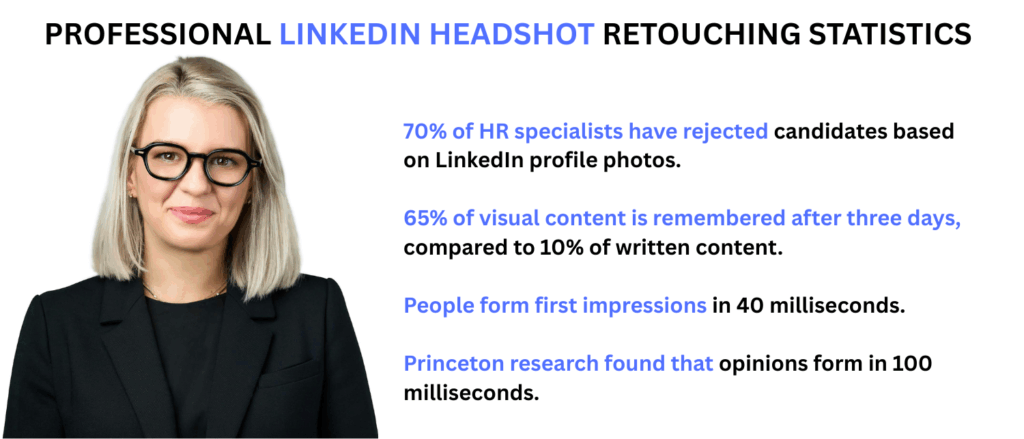
Retouched headshots on LinkedIn enhance professionalism, confidence, and approachability. A polished profile photo influences recruiters’ decisions within seconds. Research shows that images create stronger recall and faster impressions than text.
Retouching improves image quality, helping candidates appear credible and approachable. Explore more on the Benefits of Retouched Headshots.
What Are the Best Practices for LinkedIn Headshot Retouching?
The best practices for LinkedIn headshot retouching focus on enhancing natural appearance while maintaining authenticity.
- Apply natural skin smoothing and remove distracting blemishes.
- Adjust the background to a clean, neutral, or branded setting.
- Correct lighting, color balance, and sharpness for visual clarity.
- Refine clothing details to ensure a neat, professional look.
Statistics on LinkedIn Headshot Standards
- Outdoor photos are 20% more preferred for natural lighting.
- Professional makeup enhances headshot quality by 40%.
- 75% of business headshots are now optimized for mobile-first viewing.
Subtle vs Overdone Editing on LinkedIn – What Works?
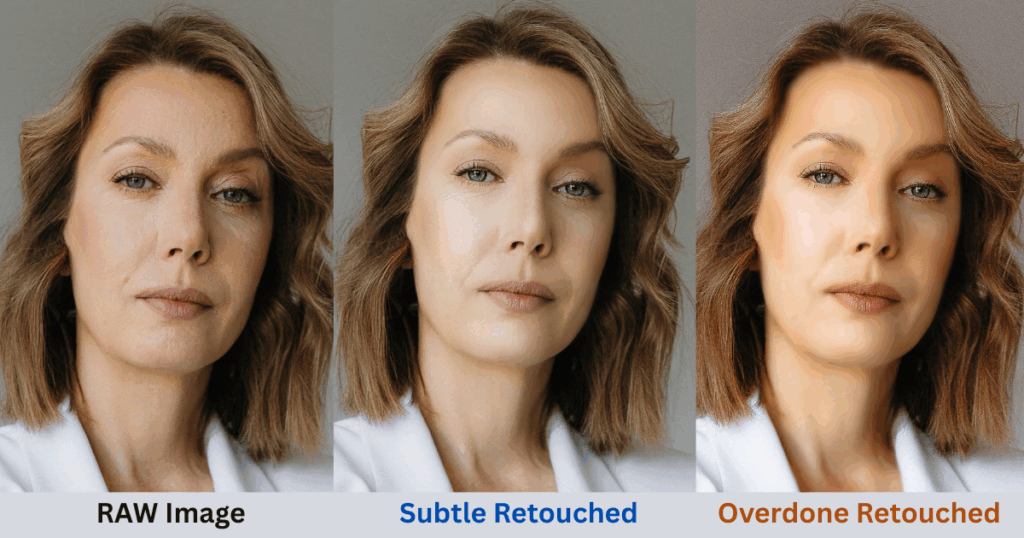
When it comes to LinkedIn headshots, the line between natural enhancement and an artificial look can make or break first impressions. Subtle retouching—like skin tone correction, light blemish removal, and brightness balance—keeps the image professional yet authentic. On the other hand, over-editing can create an unrealistic or “plastic” appearance that damages credibility.
Why Natural Editing Matters
- 46% of people say they find it easier to trust businesses that use genuine, authentic images.
- In 2024, the preferred trend is for headshots that appear “real, natural, and easy to relate to.”
- Over-editing risks producing photos that feel uncanny and unrealistic.
- The key principle: retouching should present the best version of yourself, not a different version.
👉 For a deeper comparison of editing levels, see [High-End vs Basic Headshot Retouching].
How Does LinkedIn Headshot Retouching Impact Personal Branding?
A polished LinkedIn headshot is more than just a profile photo—it’s a core element of personal branding. When professionals maintain consistent, well-retouched headshots across LinkedIn, company websites, and press kits, they create a unified image that boosts trust and recognition. This consistency makes it easier for recruiters, clients, and business partners to remember you and associate your face with your expertise.
The impact is measurable: studies show that consistent corporate imagery can increase brand recognition by up to 80%. Companies that ensure their teams have cohesive, retouched headshots report a 30% lift in brand recognition. On an individual level, a single professionally retouched headshot has the potential to deliver a 400% ROI if it leads to acquiring just one new client.
Can LinkedIn Headshots Influence Career Opportunities?
Your LinkedIn headshot plays a critical role in how recruiters and clients perceive you. In today’s competitive market, where over 30 million job postings are active on LinkedIn, a polished headshot can mean the difference between being noticed or overlooked. Recruiters are more likely to shortlist candidates who appear professional, approachable, and confident—qualities that retouched headshots emphasize.
The career impact is proven. Professionals using high-quality headshots report 15% more client leads, while a HeadshotPro case study revealed $50,000+ in monthly revenue growth directly tied to improved professional branding. With the professional headshot photography market valued at $1.2 billion in 2024 and projected to reach $2.5 billion by 2033, it’s clear that companies and individuals alike are investing in strong visual branding to unlock career opportunities.
How Does Retouching for LinkedIn Differ from Corporate Headshots?
While both types of headshot retouching enhance professionalism, the goals are different. LinkedIn headshots focus on strengthening individual professional branding—helping candidates stand out to recruiters, clients, and peers. On the other hand, corporate headshots emphasize team consistency and company branding, ensuring leadership bios, websites, and press kits project a unified identity.
The difference also extends to investment and presentation. Corporate headshots typically cost $125–$275 per person, reflecting the need for uniform standards across teams. LinkedIn-focused retouching is more personal, designed to highlight the best version of an individual. Interestingly, 35% of professionals now prefer outdoor settings over sterile backdrops, aligning with the trend of authenticity in business imagery. For deeper insights into why companies prioritize consistency, explore Corporate Headshot Retouching Importance.
Where Can You Get Professional LinkedIn Headshot Retouching?
When it comes to LinkedIn headshots, you have two main options: DIY editing or outsourcing to professional retouchers. While DIY tools can be affordable and accessible, they often result in limited quality, inconsistent results, and aren’t scalable when multiple images need refinement.
By contrast, professional retouching services offer superior quality with faster turnaround times—typically within 24 to 72 hours. Costs vary depending on the service:
- Basic professional editing: $0.30 to $10+ per image
- Advanced retouching: $10 to $50 per image
- AI-based headshot services: Around $29 per package
The investment pays off in reliability, scalability, and a polished image that supports your career goals. Professionals also leverage advanced tools such as Adobe Photoshop to ensure precise and natural results.
For those seeking expert solutions tailored to LinkedIn and beyond, our dedicated Headshot Retouching Service Page outlines the full range of options available.
FAQs on Retouching for LinkedIn Headshots
How much does professional headshot retouching cost?
Professional headshot retouching typically costs $10 to $50 per image. Basic editing ranges from $0.50 to $2.00, while advanced retouching can cost $2.50 to $10+. Professional photo sessions range from $200-$1,500 depending on location and experience.
How often should I update my LinkedIn headshot?
Update your LinkedIn headshot every 2-3 years or after significant appearance changes. Your photo should reflect how you look today to maintain credibility with recruiters.
What’s the difference between basic and professional retouching?
Basic retouching includes blemish removal and color correction, while professional retouching involves natural skin smoothing, lighting adjustment, and professional polish taking 30 minutes to 1 hour per image. Professional retouching should make you look like “the best version of yourself, not a different version”.
Can I use AI for LinkedIn headshot retouching?
Yes, AI headshot services cost around $29 and can generate professional results. 25% of HeadshotPro customers use AI headshots on LinkedIn. However, ensure the result looks authentic and professional.
What file format should my LinkedIn headshot be?
LinkedIn accepts .jpeg and .png formats up to 3 MB. Optimal resolution is 400 x 400 pixels. Always choose high-resolution photos for best results.
Should my LinkedIn photo be color or black and white?
Color photos are preferred as they’re more inviting and friendly-looking. Black and white can have a moody feel but colored photos typically perform better for professional networking.
What are common LinkedIn headshot mistakes to avoid?
Common mistakes include: using outdated photos, over-editing that looks fake, distracting backgrounds, inappropriate clothing, and low-resolution images. 67% of consumers believe image quality is extremely important.
How long does professional headshot retouching take?
Professional retouching typically takes 10-20 minutes per image for basic work, while comprehensive retouching can take 30 minutes to 1 hour. Most services offer 24-72 hour turnaround.
Conclusion – Why Invest in LinkedIn Headshot Retouching?
Investing in retouching for LinkedIn Headshots offers measurable professional benefits. Profiles with polished headshots gain 21x more visibility, enhancing personal branding and making stronger impressions on recruiters and clients.
Professional retouching also drives career growth opportunities and can yield an ROI of up to 400% from new client acquisitions or professional connections. To maximize these advantages, consider outsourcing to experts or using professional services, such as our Headshot Retouching Service Page, to ensure consistent, high-quality results.