Product photography is the foundation of online sales success, but raw images rarely meet the standards required for modern ecommerce platforms. Learning how to edit product images for ecommerce is essential for any online seller who wants to increase conversions, build customer trust, and meet marketplace requirements.
Whether you’re selling on Amazon, Shopify, Etsy, or your own website, properly edited ecommerce product images can make the difference between a sale and a bounce. This comprehensive guide will walk you through the entire process of how to edit product images for ecommerce, from basic background removal to advanced techniques that make your products stand out.
What Is Ecommerce Product Image Editing?
Ecommerce product image editing is the process of enhancing raw product photographs to meet professional standards and marketplace requirements. This involves removing backgrounds, correcting colors, retouching imperfections, adding shadows, and optimizing file sizes for web performance.
When you learn how to edit product images for ecommerce, you go beyond basic photo adjustments. It requires understanding both technical specifications and visual merchandising principles. The goal is to present your products in the most appealing way while maintaining accuracy and honesty about what customers will receive.
Ecommerce photo editing encompasses several key techniques:
- Background removal and replacement
- Color and exposure correction
- Dust and imperfection removal
- Shadow and reflection creation
- Resizing and file optimization
- Cropping and composition adjustment
These techniques ensure your product images look professional, load quickly, and meet the strict requirements of major online marketplaces.
Ecommerce Product Image Editing Requirements
Before diving into the process of how to edit product images for ecommerce, you need to understand the technical requirements that most platforms enforce. These ecommerce product image requirements vary slightly between platforms, but certain standards are nearly universal.
Understanding product image standards for ecommerce helps you create images that won’t be rejected by Amazon, eBay, Walmart, or other platforms. Most marketplace image guidelines share common elements that you should follow from the start.
Background Requirements
The most common requirement across ecommerce platforms is white background product images. Specifically, this means a pure white background with RGB values of 255, 255, 255—not off-white, cream, or light gray.
Amazon, for example, requires main product images to have a pure white background. Other platforms have similar requirements, making background removal a fundamental skill when you edit product images for ecommerce.
Some sellers prefer transparent background product images for use on their own websites or for lifestyle shots. Transparent backgrounds (saved as PNG files) allow products to be placed on any background color or pattern, offering more flexibility in web design.
Image Size & Aspect Ratio
Understanding ecommerce product image size requirements is crucial for both quality and platform compliance. Most platforms require minimum dimensions to enable zoom functionality, which significantly impacts conversion rates.
Product image dimensions for ecommerce typically start at 1000×1000 pixels as a minimum, though many platforms recommend 2000×2000 pixels or higher. Amazon requires images to be at least 1000 pixels on the longest side to enable the zoom feature.
The most common aspect ratios are:
- 1:1 (square) – The standard for most ecommerce platforms, ideal for consistent product grids
- 4:5 (portrait) – Popular for apparel and vertical products, commonly used on Instagram Shopping
- 16:9 (landscape) – Less common but useful for wide products like electronics or furniture
Using 1000×1000 product images or larger ensures your images remain sharp on high-resolution displays and allow customers to examine product details closely.
Step-by-Step Process to Edit Product Images for Ecommerce
Now let’s explore the complete guide on how to edit product images for ecommerce step by step, covering each essential technique you’ll need to master for professional results.
Step 1 – Background Removal
Background removal for product images is typically the first and most important step when you edit product images for ecommerce. A clean, distraction-free background puts all focus on your product and meets marketplace requirements.
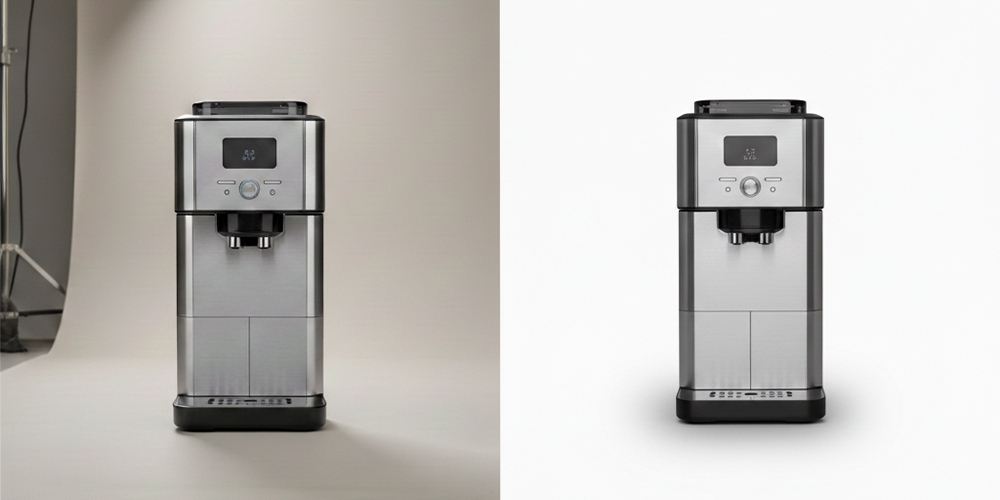
To remove background from product photos, you have several options:
Manual selection methods (Photoshop):
- Use the Pen Tool for precise edges on products with clean lines
- Use the Magic Wand or Quick Selection for products with high contrast backgrounds
- Refine edges using Select and Mask for products with fine details like hair or fabric
AI-powered tools:
- Remove.bg automatically detects and removes backgrounds in seconds
- Photoroom offers one-click background removal with mobile apps
- Photoshop’s Remove Background feature uses AI for quick results
After removing the background, replace it with pure white (RGB 255, 255, 255) for marketplace compliance or save as PNG with transparency for flexible use.
Step 2 – Color Correction & Adjustment
Accurate color representation is critical when you edit product images for ecommerce. Color correction for product images ensures customers see true-to-life colors, reducing returns due to mismatched expectations.
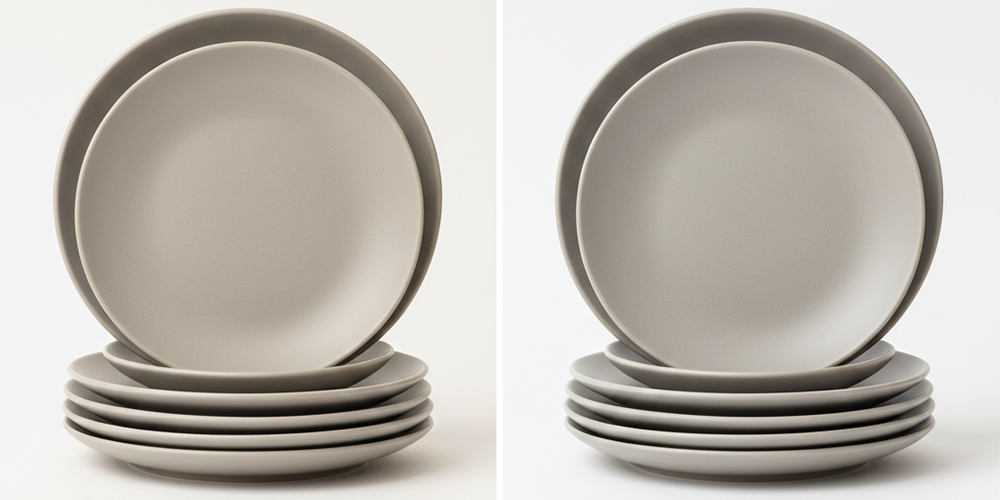
Product photo color accuracy involves several adjustments:
White balance adjustment:
- Correct color casts from indoor lighting (often yellow/orange)
- Neutralize blue tints from outdoor or flash photography
- Use the gray eyedropper tool on a neutral area of your photo
Brightness and contrast:
- Increase brightness to make products appear fresh and appealing
- Adjust contrast to make details more visible
- Avoid overexposure that loses detail in highlights
Color saturation:
- Slightly increase saturation to make colors pop
- Don’t oversaturate, which creates unrealistic expectations
- Match colors to the actual product to reduce returns
Use Lightroom’s HSL panel or Photoshop’s Hue/Saturation adjustment layer for precise color control over individual color ranges.
Step 3 – Retouching & Cleaning
Product image retouching removes distractions and imperfections while maintaining an honest representation of your product. When you edit product images for ecommerce, the goal is to show the product at its best without misleading customers.
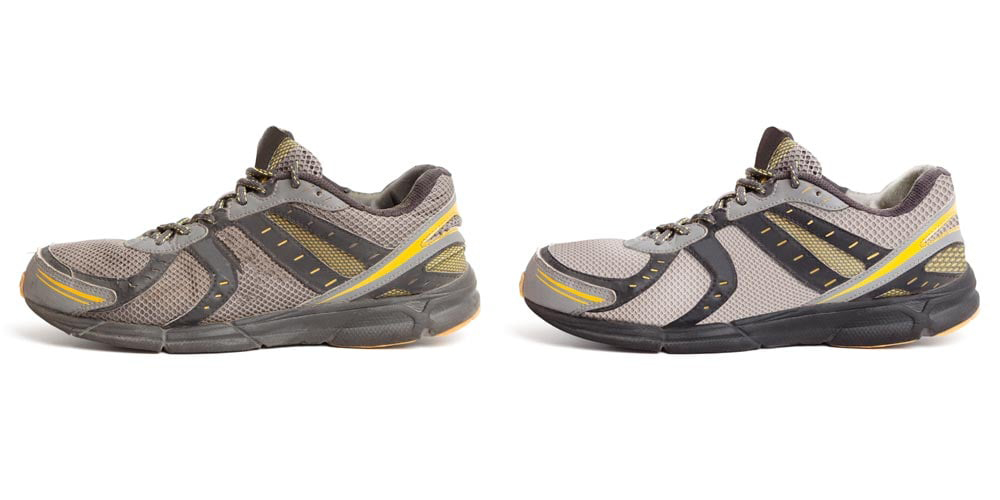
To remove dust from product photos and other imperfections:
- Use the Spot Healing Brush for small dust spots and scratches
- Clone Stamp tool for larger imperfections or repeating patterns
- Healing Brush for texture-matched repairs
- Patch tool for larger areas needing replacement
Ecommerce photo cleanup also includes:
- Removing wrinkles from fabric products (but keep natural texture)
- Cleaning smudges from glass or reflective surfaces
- Fixing minor manufacturing defects that don’t affect functionality
- Removing strings, tags, or packaging materials
Be careful not to over-retouch. Customers should receive exactly what they see in your images to maintain trust and reduce returns.
Step 4 – Shadow Creation
Professional product images often include shadows to create depth and make products appear more three-dimensional. Shadow creation is an important technique when you edit product images for ecommerce, as it adds realism and helps products “sit” naturally on the white background.
There are two main types of shadows for ecommerce:
Drop shadow product images:
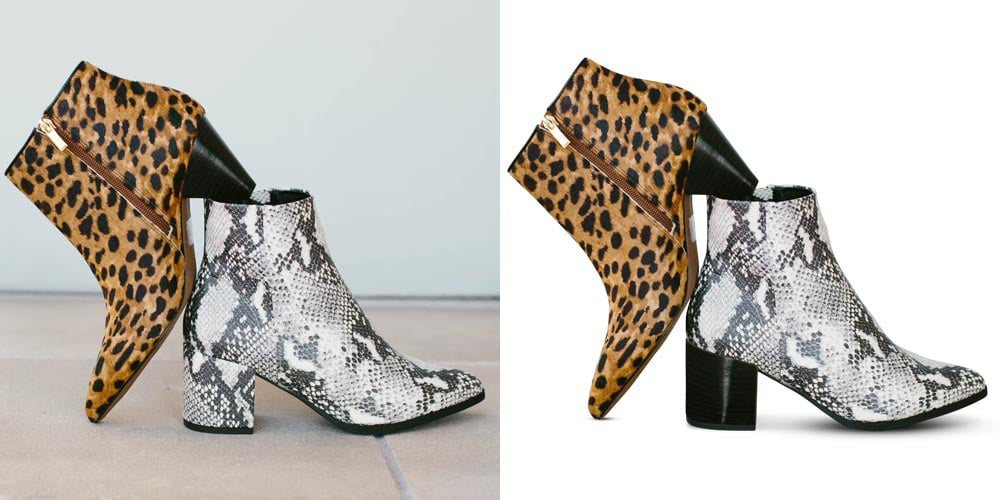
- Creates a soft shadow beneath the product
- Gives the impression the product is hovering slightly above the surface
- Works well for smaller items like jewelry, electronics, or cosmetics
Reflection shadow ecommerce:

- Creates a mirror-like reflection beneath the product
- Adds elegance and sophistication
- Popular for luxury items, bottles, and glossy products
To create natural shadows in Photoshop:
- Duplicate your product layer
- Transform the duplicate, flip it vertically, and position it below
- Apply Gaussian Blur and reduce opacity
- Use a gradient mask to fade the shadow naturally
- Adjust shadow color to match your lighting (rarely pure black)
Shadows should be subtle and realistic. Overly dark or sharp shadows look artificial and unprofessional.
Step 5 – Advanced Editing (When Needed)
Some products require specialized techniques when you edit product images for ecommerce. Ghost mannequin editing is essential for apparel sellers who want to show how clothing fits without using visible models or mannequins.
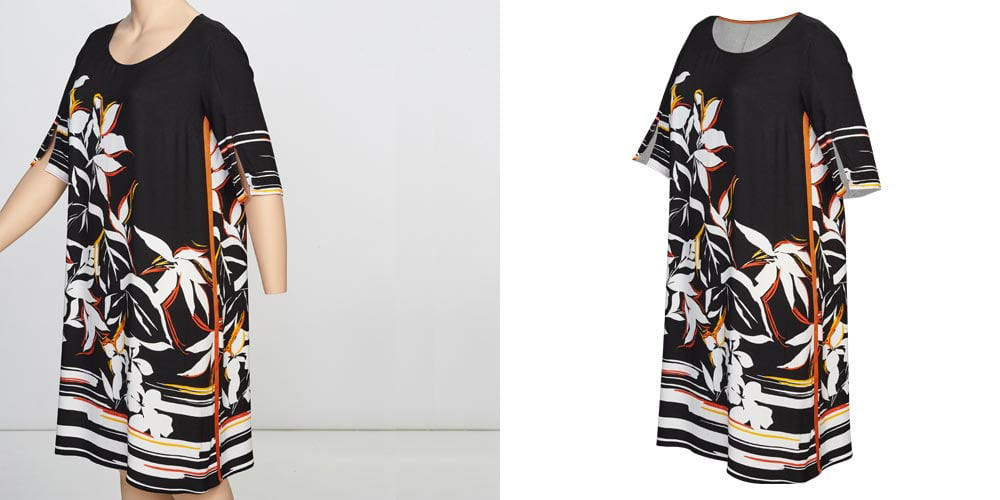
The invisible mannequin ecommerce technique creates a hollow effect that shows both the outside and inside of garments:
- Photograph the garment on a mannequin from the front
- Photograph the inside/back separately (often using a hanger)
- Remove the mannequin from the main image
- Composite the inside view into the hollow areas
- Clean up and blend the edges for a seamless look
Apparel product photo editing also includes:
- Enhancing fabric texture and detail
- Correcting garment shape and fit
- Removing mannequin parts while preserving garment structure
- Creating consistent styling across product lines
These advanced techniques require practice but significantly improve the presentation of clothing, bags, and other wearable items.
Step 6 – Cropping, Resizing & Optimization
The final step in how to edit product images for ecommerce is preparing files for web use. Ecommerce image optimization balances visual quality with page loading speed.
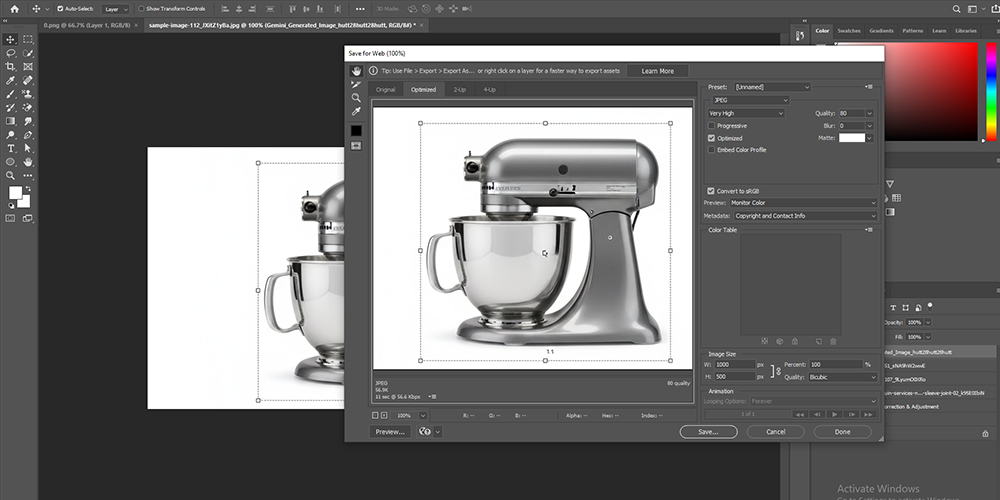
Cropping best practices:
- Center the product in the frame
- Leave consistent white space around all sides (typically 5-10% margin)
- Maintain the same composition across all product images for visual consistency
Resizing guidelines:
- Export at required dimensions (minimum 1000×1000, ideally 2000×2000)
- Maintain aspect ratio to prevent distortion
- Use high-quality resampling methods (Bicubic Sharper in Photoshop)
Compression techniques:
- Save as JPEG at 80-90% quality for photos with backgrounds
- Use PNG-8 for simple graphics with limited colors
- Use PNG-24 for images requiring transparency
- Use compression tools like TinyPNG or ImageOptim to reduce file size further
Aim for image files under 200KB when possible. Faster loading images improve SEO, reduce bounce rates, and increase conversions.
Best Tools for Editing Ecommerce Product Images
Choosing the right ecommerce product image editing tools depends on your budget, skill level, and volume of images you need to process. Understanding which tools work best will help you edit product images for ecommerce more efficiently.
Professional Tools
Photoshop for product image editing:
- Industry standard with the most comprehensive feature set
- Best for precise control and complex editing tasks
- Supports batch processing for high-volume editing
- Steeper learning curve but unlimited creative possibilities
- Subscription: $20.99/month for Photography plan
Lightroom ecommerce editing:
- Excellent for batch processing similar products
- Intuitive interface for color correction and basic adjustments
- Can sync edits across multiple images instantly
- Limited for advanced techniques like background removal
- Included with Photoshop Photography plan
Free & Budget Tools
Canva product photo editing:
- User-friendly interface for beginners
- Background remover included in free version
- Template-based editing for consistency
- Limited compared to professional software
- Free version available; Pro version $12.99/month
Free product image editing tools:
- GIMP – Free Photoshop alternative with powerful features
- Photopea – Browser-based editor with Photoshop-like interface
- Pixlr – Simple online editor for basic adjustments
- Paint.NET – Free Windows-only editor with plugins
AI-Based Editing Tools
AI product image editing tools have revolutionized how quickly sellers can edit product images for ecommerce:
Remove.bg:
- Instant background removal with impressive accuracy
- Handles hair, fur, and complex edges well
- Free for low-resolution; paid plans for high-res
- API available for integration into workflows
Photoroom:
- Mobile-first AI editing app
- Instant background removal and replacement
- Batch processing and templates
- Shadow generation and smart resize features
- Free version available; Pro version $9.99/month
Other AI tools:
- Clipping Magic – Interactive background removal
- Slazzer – Bulk background removal
- Pixelcut – AI-powered mobile editing suite
Best Practices for Ecommerce Product Image Editing
Following ecommerce product image best practices ensures your images drive sales while maintaining efficiency. These practices apply whether you edit product images for ecommerce yourself or outsource the work.
Consistency is crucial:
- Use the same lighting, background, and composition across all products
- Maintain identical white space and product positioning
- Create editing presets or templates for similar products
Show multiple angles:
- Include 5-7 images per product showing different views
- Highlight important details, textures, and features
- Include scale references when size might be unclear
Maintain accurate representation:
- Edit to enhance, not deceive
- Colors should match the actual product precisely
- Don’t hide defects that affect product quality
Optimize for mobile:
- Ensure details are visible even on small screens
- Test zoom functionality on mobile devices
- Keep file sizes small for fast mobile loading
Create a consistent workflow:
- Document your editing process for reproducibility
- Use batch processing when possible
- Organize files with clear naming conventions
Common Mistakes to Avoid in Ecommerce Image Editing
Understanding common mistakes helps you avoid problems that hurt conversions when you edit product images for ecommerce:
Over-editing:
- Making products look nothing like what arrives
- Excessive smoothing that removes texture and detail
- Unrealistic colors or brightness levels
Inconsistent standards:
- Mixing different background shades across products
- Varying image sizes and aspect ratios
- Different levels of editing quality
Poor file management:
- Not saving original files before editing
- Using lossy formats (JPEG) for multiple rounds of editing
- Insufficient file size optimization causing slow page loads
Technical errors:
- Harsh shadow edges or unrealistic shadow placement
- Visible cutout marks or halos around products
- Color shifts from incorrect color space conversion
Ignoring platform requirements:
- Wrong image dimensions causing pixelation
- Background colors that don’t match RGB 255,255,255
- File names that don’t follow platform guidelines
How Many Product Images Should You Upload?
Determining how many product images for ecommerce you should use impacts both customer confidence and conversion rates. Research shows that more images generally lead to higher conversion rates.
Recommended image counts:
- Minimum: 3-4 images (front, back, detail, lifestyle)
- Optimal: 5-7 images for most products
- Complex products: 8-12 images for items with many features
Include these types of images:
- Main image on white background (meets marketplace requirements)
- Alternative angle on white background
- Detail shots showing texture, quality, or features
- Size/scale reference image
- Lifestyle or in-use context image
- Packaging image (when relevant)
- Infographic highlighting key features
More images reduce uncertainty and answer customer questions visually, reducing both inquiries and returns.
DIY Editing vs Professional Product Image Editing Services
When deciding between doing it yourself and using professional product image editing services, consider your time, skills, volume, and budget. Many sellers wonder whether they should edit product images for ecommerce themselves or hire professionals.
DIY editing makes sense when:
- You have fewer than 20 products
- You have basic photo editing skills
- You have time to learn and practice
- Budget is extremely limited
- You need complete control over the process
Professional services are worth it when:
- You have hundreds or thousands of SKUs
- Time is more valuable than money
- You need consistently high-quality results
- Your products require advanced techniques
- You want to focus on core business activities
Professional editing service costs:
- Basic background removal: $0.50-$2.00 per image
- Advanced retouching: $3.00-$10.00 per image
- Ghost mannequin editing: $5.00-$15.00 per image
- Bulk discounts typically available
Many successful sellers use a hybrid approach: learning how to edit product images for ecommerce for simple products while outsourcing complex or high-volume editing work.
Frequently Asked Questions About How to Edit Product Images for Ecommerce
How to edit product images for ecommerce if you’re a beginner?
If you’re new to editing, start with user-friendly tools like Canva or Photoroom that offer automated features. Begin by mastering basic techniques: background removal, brightness adjustment, and resizing. Focus on one skill at a time, practice with a few products, then gradually move to more advanced techniques. Free tutorials on YouTube can help you learn how to edit product images for ecommerce without formal training.
What software do I need to edit product images for ecommerce?
You can edit product images for ecommerce using various software options depending on your budget and skill level. Professional options include Adobe Photoshop and Lightroom. Free alternatives include GIMP, Photopea, and Canva. AI-powered tools like Remove.bg and Photoroom are excellent for quick background removal. Choose software that matches your technical abilities and editing volume.
How long does it take to edit product images for ecommerce?
The time required to edit product images for ecommerce varies based on complexity and your skill level. Simple edits (background removal and basic adjustments) take 2-5 minutes per image. Advanced editing with retouching, shadows, and ghost mannequin techniques can take 10-30 minutes per image. As you gain experience and create templates, you’ll significantly reduce editing time.
Can I edit product images for ecommerce on my phone?
Yes, you can edit product images for ecommerce using mobile apps like Photoroom, Snapseed, Adobe Lightroom Mobile, and Pixelcut. These apps offer background removal, color correction, and basic retouching. However, for complex edits or high-volume work, desktop software provides more precision and efficiency. Mobile editing works well for simple products or when you need quick edits on the go.
Do I need to edit product images for ecommerce if I use good photography?
Even with excellent photography, you still need to edit product images for ecommerce to meet platform requirements. Most marketplaces require pure white backgrounds (RGB 255,255,255), specific dimensions, and consistent presentation. Editing also helps remove minor imperfections, optimize file sizes for fast loading, and ensure color accuracy across different devices.
How much does it cost to edit product images for ecommerce professionally?
Professional services to edit product images for ecommerce typically cost $0.50-$2.00 per image for basic background removal, $3.00-$10.00 for advanced retouching, and $5.00-$15.00 for complex techniques like ghost mannequin editing. Bulk orders usually receive discounts. DIY editing using free or subscription tools ($10-$25/month) is more economical but requires time investment.
What’s the most important step when you edit product images for ecommerce?
Background removal is the most critical step when you edit product images for ecommerce. A clean, pure white background (RGB 255,255,255) is required by most major platforms and ensures your product is the sole focus. Without proper background removal, your images may be rejected by marketplaces or appear unprofessional to customers.
Should I batch edit product images for ecommerce or edit them individually?
For efficiency, use batch editing when you edit product images for ecommerce that share similar characteristics (same lighting, background, product type). Create presets or actions in Photoshop or Lightroom to apply consistent adjustments across multiple images. However, each product still needs individual attention for retouching, cropping, and final quality checks.
How do I maintain consistency when I edit product images for ecommerce?
To maintain consistency when you edit product images for ecommerce, create detailed style guides documenting your exact settings (background color, white space margins, shadow style, color correction values). Use the same lighting setup for photography, save editing presets, and apply identical crops and compositions. Review all images side-by-side before uploading to ensure visual uniformity.
What image format should I use when I edit product images for ecommerce?
When you edit product images for ecommerce, save main product images as JPEG files with 80-90% quality for optimal balance between visual quality and file size. Use PNG format only when you need transparent backgrounds or have graphics with text. Avoid TIFF or other large formats for web use, as they significantly slow page loading speeds.
Final Thoughts
Mastering how to edit product images for ecommerce is a valuable skill that directly impacts your online sales success. From understanding white background requirements to implementing advanced techniques like ghost mannequin editing, each step in the process contributes to creating images that build trust and drive conversions.
Start with the basics—background removal, color correction, and proper sizing—then gradually expand your skills to include retouching, shadow creation, and optimization. Whether you choose to edit product images for ecommerce yourself or work with professional services, understanding the process ensures you can maintain the quality standards that today’s online shoppers expect.
Remember that ecommerce product images are often the only way customers can evaluate your products before purchasing. Investing time and resources into learning how to edit product images for ecommerce creates a competitive advantage that translates directly to increased sales and reduced returns.
As you continue refining your editing workflow and mastering how to edit product images for ecommerce, focus on consistency, accuracy, and meeting platform requirements. With practice and the right tools, you’ll develop an efficient process for creating professional product images that showcase your products in their best light.
Ready to take your ecommerce product images to the next level? If you’re looking to save time while ensuring consistently professional results, Clipping Path Experts offers comprehensive ecommerce product photo editing services tailored to your business needs. Our experienced team handles everything from background removal and color correction to advanced ghost mannequin editing and shadow creation—all at competitive prices with quick turnaround times. Get a free quote today and discover how professional editing can transform your product images and boost your online sales.
Sonnet 4.5