This product photo lighting guide reveals professional techniques transforming amateur shots into conversion-driving assets. Poor lighting costs eCommerce sellers thousands in returns annually while proper illumination reduces product misrepresentation by 40%.
75% of online shoppers consider product images the most important factor when making purchase decisions. Yet most sellers underestimate lighting’s critical role, focusing on expensive cameras while shooting under inadequate illumination. Professional product photo lighting establishes the foundation for successful eCommerce imagery that no amount of post-processing can fix.
Pre-Lighting Preparation For Product Photo Lighting: Product Sanitization and Styling
Professional photographers know that 50% of lighting problems stem from inadequate product preparation. Before positioning a single light, products require meticulous cleaning and styling to prevent magnifying flaws under powerful lighting.
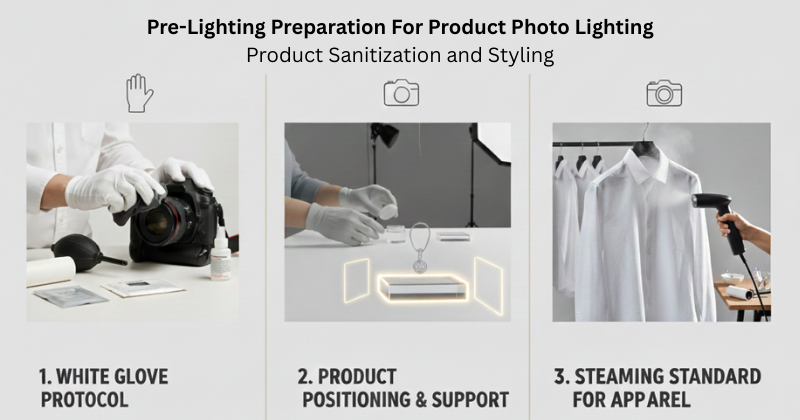
The White Glove Protocol
Oil from fingerprints creates visible highlights under studio lighting, especially on glossy or metallic surfaces. Use white cotton gloves when handling products, and clean surfaces with microfiber cloths. For fabric items, lint rollers remove dust and fibers that become visible under directional lighting. Electronics require compressed air to eliminate dust from ports and crevices that shadow lighting will emphasize.
Product Positioning and Support Systems
Unstable products shift between shots, destroying lighting consistency. Museum wax or glue dots secure round items like bottles or spherical objects without leaving residue. Clear acrylic risers create “floating” effects for jewelry photography, while fishing line suspends lightweight items at precise angles. These invisible supports maintain product position during extended shoots involving multiple lighting adjustments.
The Steaming Standard for Apparel
Fabric wrinkles become pronounced under side lighting or rim lighting setups. Professional apparel photography requires steaming garments immediately before shooting—wrinkles that seem minor in person cast distinct shadows under studio lights. A handheld steamer ($30-50) eliminates this issue and reduces < texture enhancement > requirements during post-processing.
Why Product Photo Lighting Matters for ecommerce Success
Product photo lighting directly impacts your bottom line. Research shows that 40% of online returns connect to image misrepresentation—when lighting fails to accurately show product color, texture, or details, customers return items. Proper lighting builds customer trust by showing products exactly as they appear in person.
Lighting quality matters more than post-processing capability. A well-lit product photo requires minimal editing, while poor lighting forces extensive corrections in < exposure balancing > and creates inconsistencies across product catalogs. Professional lighting reduces editing time by 60% and creates the foundation for maintaining < product image consistency > throughout your entire catalog.
Essential Product Photo Lighting Positions Explained

Key Light: Your Primary Light Source
The key light serves as your primary illumination source. Position it at a 45-degree angle from the product at a minimum distance of 3 feet. This angle creates dimensional depth and reveals product texture without harsh shadows. The 45-degree positioning establishes natural-looking shadows that help customers understand product shape and details.
Fill Light: Shadow Control
Fill light reduces harsh shadows created by your key light. Place it 90 degrees opposite your key light at 50-75% intensity. This ratio maintains dimensional appearance while preventing shadows from becoming too dark. Fill light is essential for < shadow creation > that looks natural rather than dramatic or theatrical.
Rim and Accent Lighting
Back lighting, also called rim lighting, separates products from backgrounds by creating an edge highlight. This technique proves especially valuable for dark products on dark backgrounds. Accent lights highlight specific product details or textures. Combined with proper < background cleanup > techniques, rim lighting creates professional separation.
Advanced Light Shaping: Beyond Basic Illumination
The Power of Negative Fill
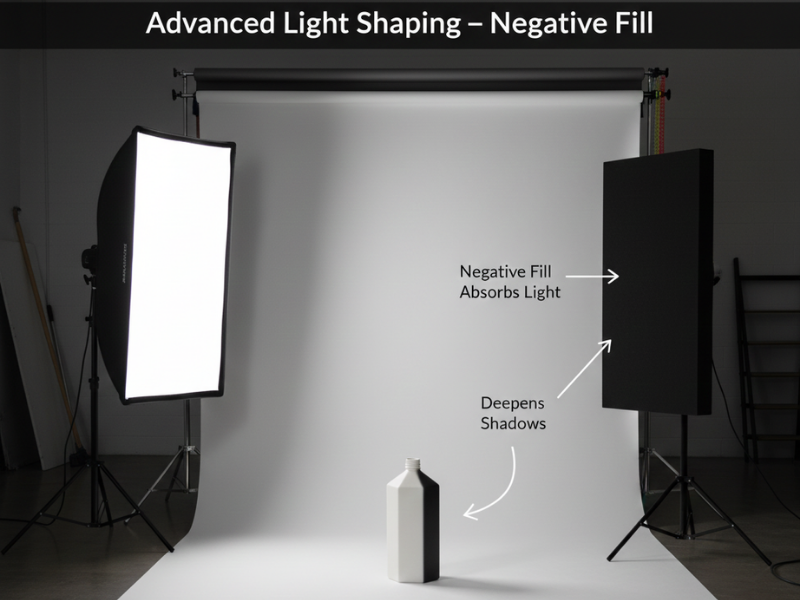
Professional lighting involves subtracting light, not just adding it. Black flags—black foam boards positioned opposite your key light—deepen shadows and add contrast. This technique defines edges on white or clear products that would otherwise blend into white backgrounds. Position black flags 12-18 inches from the product on the shadow side to create distinct edge definition essential for glassware, clear packaging, or white products.
Grid and Honeycomb Modifiers

Grids snap onto softboxes to control light spill and focus illumination specifically on products without lighting backgrounds. A 40-degree honeycomb grid narrows the light beam, allowing precise control over which product areas receive illumination. This proves valuable when highlighting logos, brand names, or hero features while keeping surrounding areas in controlled shadow. Grids prevent light spill that requires extensive < background cleanup > during editing.
V-Flats for Large Product Control
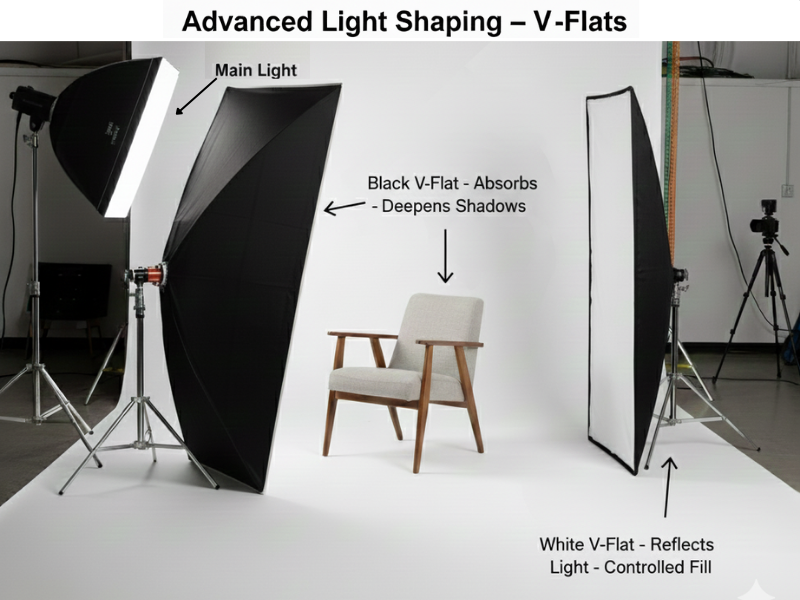
V-flats are large foldable boards (typically 4×8 feet, white on one side and black on the other) that create a controlled environment for furniture or mannequin photography. Position V-flats around products to function as movable walls—white sides reflect fill light while black sides absorb light for dramatic contrast. V-flats control reflections at a macro scale and create consistency when shooting large items requiring multiple angles.
Natural Light vs Studio Lighting Options
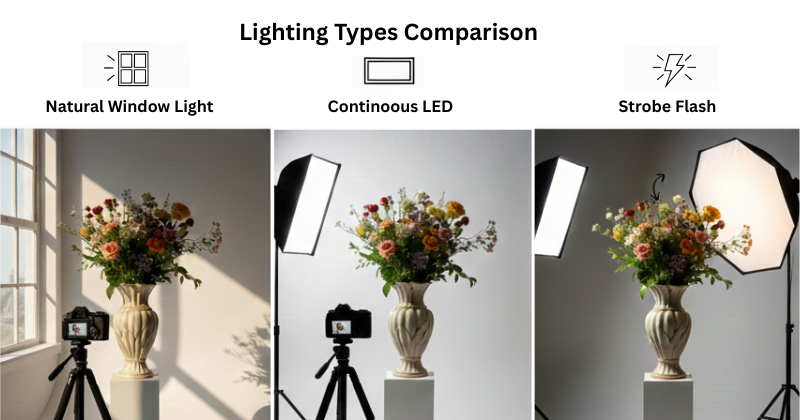
Natural Window Light Advantages
Natural light offers cost-effective, soft illumination ideal for beginners. Position products 3-5 feet from a large window during midday when light is most consistent. Use white foam boards as reflectors to fill shadows. Natural light works best for products that benefit from soft, flattering illumination but creates consistency challenges when shooting throughout the day as light quality changes.
Continuous LED Studio Lights
Continuous lights provide consistent, controllable output with color temperatures ranging from 2700K to 5500K. A typical 45W LED panel offers sufficient power for small to medium products. Continuous lighting allows real-time visualization of lighting effects, making it ideal for beginners learning lighting techniques. These lights work exceptionally well for product and food photography where you need to see exactly how shadows and highlights appear.
Strobe Flash Systems
Strobes deliver high power output that freezes motion and captures fine product details. Professional strobes offer superior detail capture compared to continuous lights but require more experience to master. Strobes justify their investment when shooting reflective products, jewelry, or items requiring maximum detail capture. The power output helps maintain low ISO settings (100-200) for minimal <noise reduction> needs during post-processing.
| Feature | Natural Light | Continuous LED | Strobe Flash |
|---|---|---|---|
| Cost | Free | $100-300 | $400-1000+ |
| Control | Limited | High | Highest |
| Learning Curve | Easy | Easy | Moderate |
| Best For | Lifestyle products | General products | Jewelry, reflective items |
Softbox Setup for Professional Results
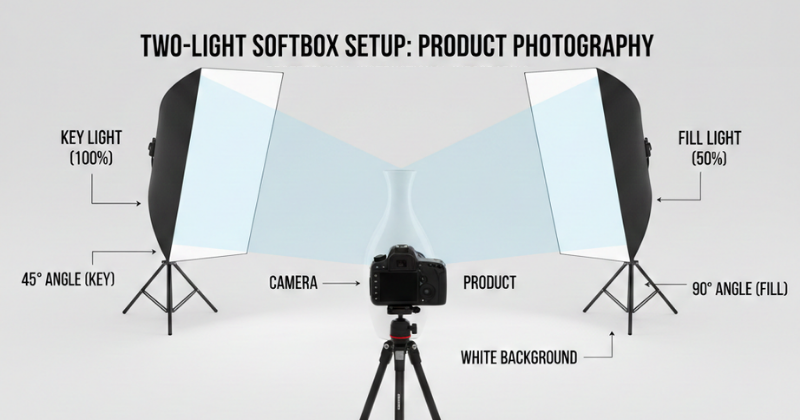
Understanding Softbox Lighting
Softboxes create soft, even light through two-layer diffusion—an internal baffle and outer diffusion panel. This double diffusion eliminates harsh shadows and creates flattering illumination. Rectangular softboxes work well for standard products, octagonal boxes create catchlights in reflective surfaces, and strip boxes excel at lighting long products or creating edge lighting.
Size matters: use 24×24″ softboxes for small products, 32×48″ for medium products, and larger sizes for furniture or oversized items. Larger softboxes create softer light but require more power.
Softbox Positioning Technique
Position your main softbox at 45 degrees from the product at 3+ feet distance. Height should place the light center slightly above product level, angling down at 30-45 degrees. This creates natural-looking shadows that fall away from camera view. Distance affects light softness—closer placement creates softer shadows but risks uneven coverage.
For two-softbox setups, place the second box 90 degrees opposite at reduced power (50-75% of key light). This configuration provides excellent control over shadow depth while maintaining dimensional appearance. The setup integrates naturally with < white balance correction > workflows when you maintain consistent color temperature across all lights.
Light Tent and Light Box Solutions
Light tents provide 360-degree diffusion ideal for small products like jewelry, cosmetics, or electronics. The enclosed design eliminates stray reflections and creates even, shadowless lighting. Choose tent sizes matching your products—typically 16″, 24″, or 32″ cubes work for most small product photography.
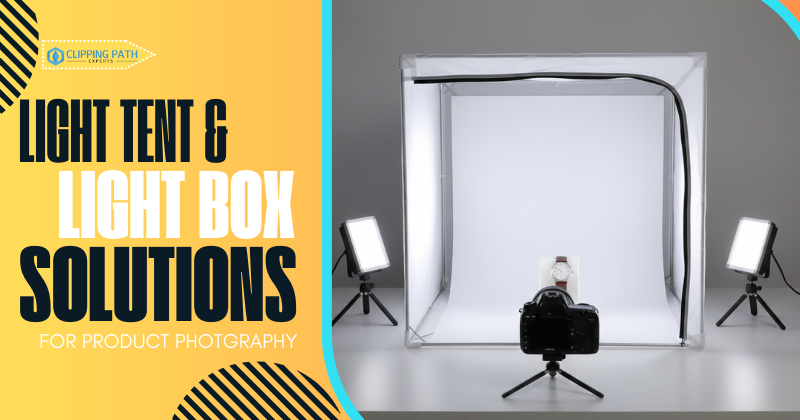
Light Tent Setup Process
- Position 2-4 continuous lights around tent exterior at 45-degree angles
- Place product on white or colored backdrop inside tent
- Shoot through tent’s front opening
- Adjust light positions to eliminate any visible hotspots
Light tents simplify lighting but limit creative control. They work best for catalog photography requiring consistency across hundreds of products. For items needing < reflection retouching > or creative lighting, traditional softbox setups offer more flexibility.
DIY light boxes cost $20-30 using poster board, tissue paper, and desk lamps. Cut windows in box sides, cover with tissue paper for diffusion, and position lights outside. Results match commercial tents for small products under 12 inches.
Reflectors and Diffusers for Light Control
Reflector Types and Applications
A 5-in-1 reflector kit ($30-50) includes white, silver, gold, black, and translucent surfaces. White reflectors provide subtle fill light without altering color temperature. Silver reflectors create brighter fill for high-contrast products. Gold reflectors add warmth—use sparingly to avoid unnatural color casts. Black surfaces function as flags for negative fill, deepening shadows for dramatic effects.
Position reflectors 12-24 inches from products at angles that bounce key light into shadow areas. Adjust distance to control fill intensity—closer placement creates stronger fill. Multiple reflectors can replace fill lights in budget setups while maintaining professional results.
Diffusion Materials
Place translucent white fabric or diffusion paper between light sources and products to soften harsh lighting. Professional diffusion fabric offers consistent results, but white shower curtains or ripstop nylon work for DIY setups. Multiple diffusion layers create progressively softer light but reduce light output—increase power or adjust camera settings to compensate.
Professional Product Photo Lighting Setups
One-Light Configuration
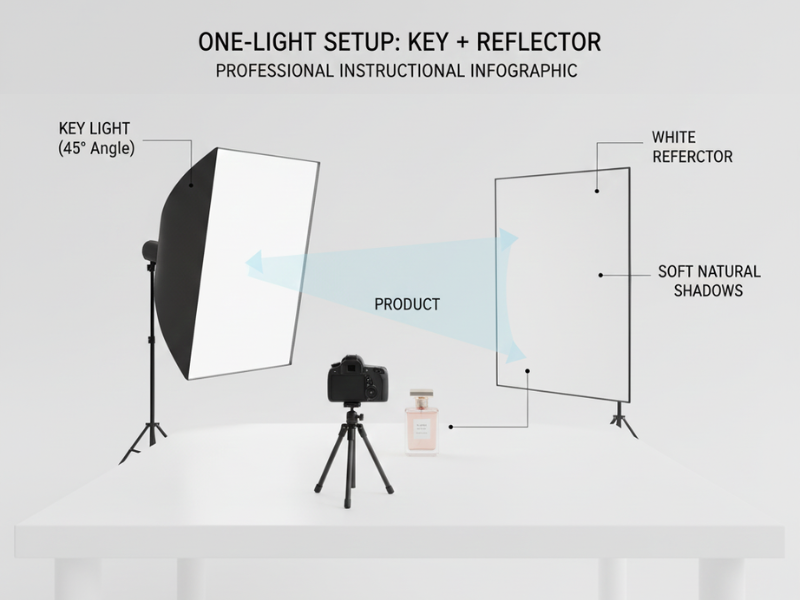
Single-light setups create dramatic, dimensional images using one key light at 45 degrees plus a white reflector for fill. This minimalist approach works well for products with interesting textures or shapes where shadows enhance visual appeal. Position the key light 3-4 feet away, place a reflector opposite at 50% distance, and adjust reflector angle until shadow depth looks natural.
Two-Light Professional Setup

Two-light configurations provide the most versatile lighting control. Place your key light at 45 degrees (100% power), fill light 90 degrees opposite (50-75% power), and adjust the ratio based on desired shadow depth. A 2:1 ratio (fill at 50%) maintains dimension while preventing harsh shadows. This setup handles 80% of product photography needs and integrates seamlessly with product photo editing guide workflows.
Three-Light Studio Configuration
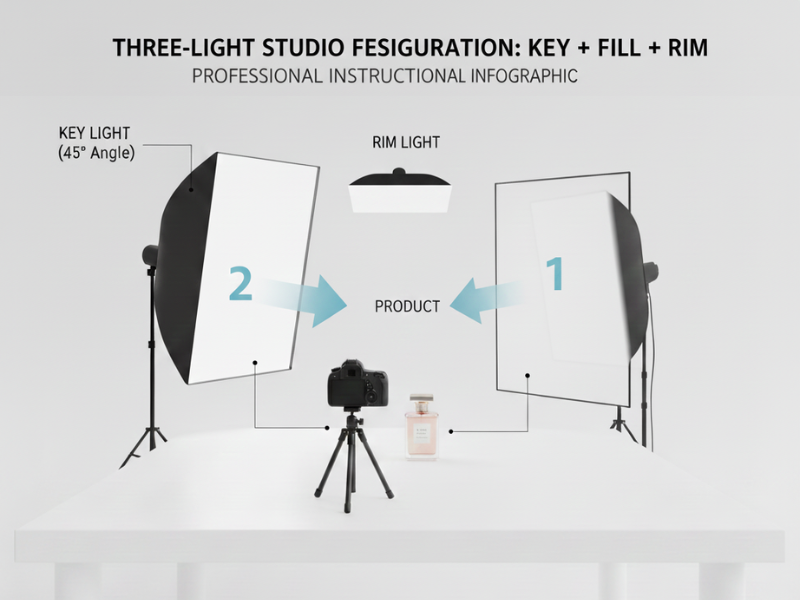
Professional three-light setups add a back or rim light to separate products from backgrounds. Position key light at 45 degrees (100% power), fill light opposite (60% power), and rim light behind product aimed at edges (40-60% power). This configuration creates professional separation, especially valuable for dark products. The rim light should create a subtle highlight—overpowering rim lights look artificial.
White Background Lighting Technique
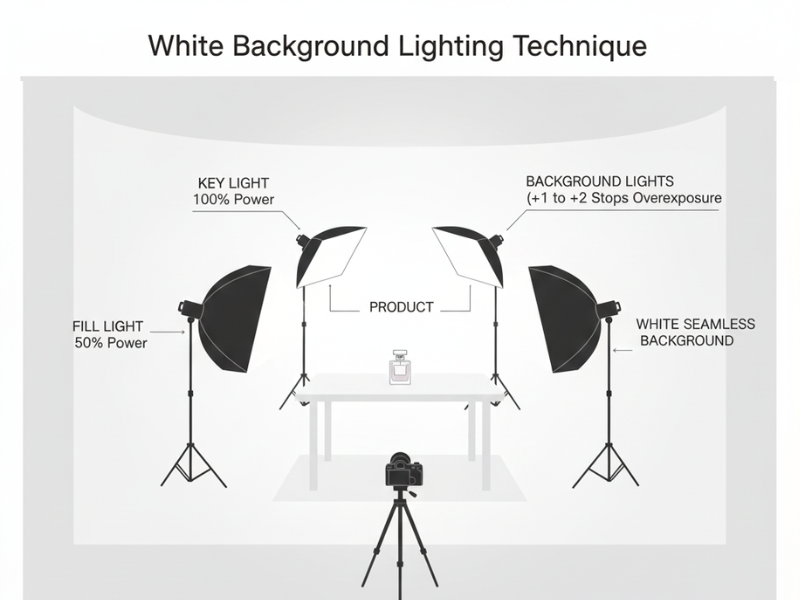
White background photography requires separate product and background lighting. Position key and fill lights on the product as described above, then add 1-2 lights aimed at the background from above or sides. Background lights should overexpose the backdrop by 1-2 stops to achieve pure white. Maintain 3-4 feet between product and background to prevent light spill. This technique simplifies < background cleanup > during post-processing.
Product Photo Lighting Techniques for Different Material Types
Matte and Absorbent Surfaces
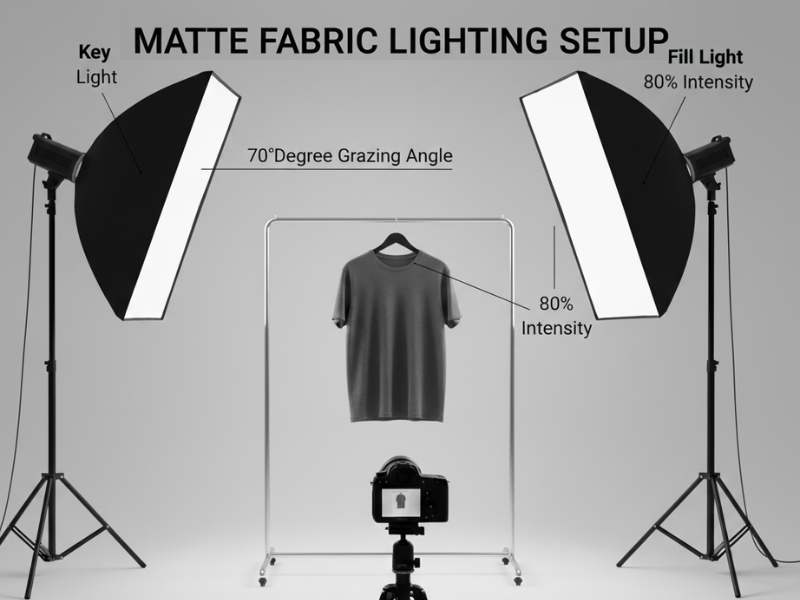
Dark fabrics and matte materials absorb light and require stronger illumination to reveal texture. Position key light at 60-70 degrees (rather than 45) to graze across surface texture. Use fill light at 70-80% intensity to prevent shadows from becoming too deep. This setup brings out fabric weave and surface details without washing out the material.
Glossy and Reflective Products
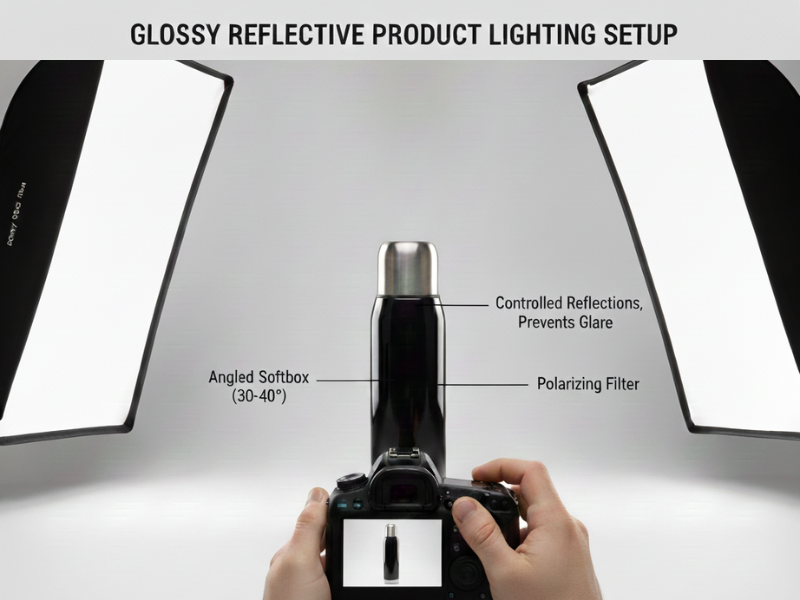
Reflective surfaces require the “family of angles” approach—positioning lights where reflections bounce away from the camera lens. Use larger light sources positioned at acute angles (30-40 degrees from product surface). Cross-polarization technique employs polarizing film over lights and a polarizing filter on the lens to eliminate stubborn reflections on chrome, glass, or polished metal surfaces.
Transparent and Translucent Items
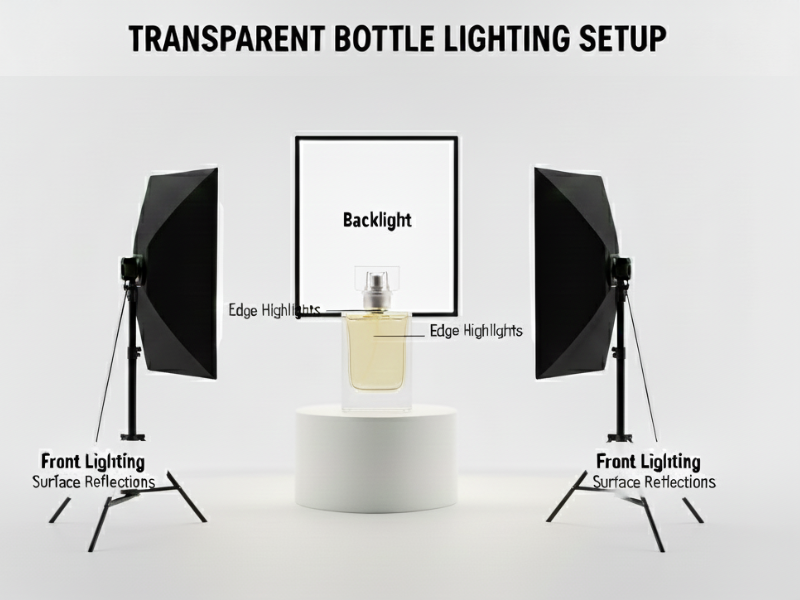
Bottles, liquids, and translucent products require backlighting to show volume and color depth. Position a light behind the product aimed toward the camera, diffused through translucent material or bounced off a white card. Front lighting controls surface reflections while backlight illuminates contents. This technique reveals liquid levels, color intensity, and container clarity simultaneously.
The Professional Workflow: Tethered Capture
Live View Monitoring
Tethered shooting connects cameras to laptops or monitors for real-time image review at full resolution. Software like Capture One or Lightroom displays images at 10x magnification, revealing dust, glare spots, or color shifts invisible on 3-inch camera screens. This eliminates the costly discovery of lighting problems after completing a 50-product shoot.
Color Calibration with Gray Cards
Gray cards establish perfect white balance in 30 seconds. Photograph a gray card under your lighting setup, use it to set custom white balance in-camera or during RAW processing. This single step ensures accurate color reproduction and prevents the color temperature inconsistencies that contribute to the 40% return rate from image misrepresentation. Custom white balance maintains < color style presets > consistency across entire product catalogs.
Focus Stacking Preparation
Jewelry and watch photography requires front-to-back sharpness impossible with single exposures. Focus stacking combines multiple images shot at different focus points. Lighting must remain absolutely consistent across 5-15 exposures—use continuous lights rather than strobes, maintain camera and product positions with sandbags or clamps, and shoot tethered to verify focus progression.
Common Product Photo Lighting Problems and Solutions
Eliminating Harsh Shadows
Harsh shadows result from small, direct light sources positioned too close. Solutions include moving lights farther away, adding diffusion, or increasing fill light intensity. The goal is shadows that define shape without becoming distracting dark areas. If shadows remain problematic, < shadow creation > techniques during post-processing can soften or remove them entirely.
Managing Reflective Surface Glare
Reflective products like jewelry, watches, or glossy packaging require special handling. Use polarizing filters on lenses to reduce glare, position lights at angles that bounce away from camera, or employ cross-polarization technique using polarizing film over lights and lens. For complex reflections requiring post-processing, < reflection retouching > techniques complete the workflow.
Fixing Inconsistent Color Temperature
Mixing light sources creates color casts—never combine daylight, tungsten, and fluorescent lighting. Use lights with matching color temperature (5500K for daylight, 3200K for tungsten) and set camera white balance accordingly. Shoot in RAW format for maximum < white balance correction > flexibility during editing. Custom white balance using a gray card ensures accuracy across product catalogs.
Correcting Uneven Background Lighting
Uneven backgrounds show graduated exposure from light to dark. Move products farther from backgrounds (4-6 feet minimum), add dedicated background lights, or adjust main light positions to prevent spill onto backgrounds. Proper setup reduces < background cleanup > time and ensures consistency.
Post-Lighting Analysis and Verification for Product Photo Lighting
The Histogram Test
Camera histograms display exposure distribution across the image. Enable “highlight alerts” (blinkies) to identify overexposed areas where product detail is lost to pure white. Proper lighting keeps the histogram centered with no clipping on either end. Blown highlights cannot be recovered in post-processing—adjust lighting intensity or add diffusion rather than accepting clipped detail.
Batch Consistency Verification
When shooting 50+ products for catalogs, lighting consistency determines whether images appear cohesive. Mark light stand positions with tape, measure distances with measuring tape, and photograph a reference object (gray card or color checker) between product changes. Compare histograms across images to verify consistent exposure. These steps maintain < product image consistency > and prevent obvious variations that harm professional appearance.
Optimal Camera Settings for Product Photo Lighting
ISO Settings for Clean Images
Maintain ISO at 100-200 for minimal digital noise. Proper lighting eliminates the need for high ISO settings—if you require ISO above 400, add more light rather than increasing sensitivity. Low ISO produces clean images requiring less < noise reduction > during post-processing and maintains maximum detail capture.
Aperture Selection
Use f/8 to f/16 for product photography. These apertures provide sufficient depth of field to keep entire products sharp while maintaining excellent detail capture. Smaller apertures (f/16-f/22) work for small products requiring maximum depth of field but may introduce diffraction softening. The proper aperture paired with professional lighting creates images ready for minimal editing following your product photo editing guide workflow.
Shutter Speed Considerations
Use tripods to enable slower shutter speeds without camera shake. Continuous lighting allows any shutter speed, while flash sync speeds typically limit you to 1/200-1/250 second. Slower speeds (1/125 or longer) work well with static products and provide flexibility when using lower-powered lights.
Product Lighting Equipment by Budget
Budget Setup ($50-150)
Natural window light combined with foam board reflectors ($10) creates professional results for lifestyle products. Add a collapsible 5-in-1 reflector ($40) and basic continuous LED panels ($60-100) for controlled lighting. This setup handles small to medium products and produces images suitable for most eCommerce platforms.
Mid-Range Setup ($150-500)
A two-light softbox kit ($150-250) with adjustable LED panels provides consistent, controllable lighting. Add background support system ($50-80), reflectors, and diffusion materials. This configuration produces professional results across diverse product categories and reduces editing time significantly.
Professional Setup ($500-2000+)
Professional strobes ($400-800 each), large softboxes ($100-200), light tent ($150), grids and modifiers ($50-100), and V-flats ($80-150) create studio-quality results. Three-light strobe systems handle any product type and deliver maximum detail capture. Invest at this level when shooting large product volumes or high-value items requiring premium imagery.
FAQs on Product Photo Lighting
What is the best lighting for product photography?
For Product Photo Lighting, the best lighting setup is two softboxes positioned at 45 degrees (key) and 90 degrees opposite (fill), which provide versatile, professional results for most products. This setup creates dimensional lighting with controlled shadows.
How many lights do you need for product photography?
Two lights (key and fill) handle 80% of product photography needs. Add a third rim light for professional separation or background lighting for white backdrop photography.
Should I use natural light for product photos?
Natural window light works well for lifestyle products and small-scale shooting but creates consistency challenges. Studio lights provide reliable, repeatable results essential for large product catalogs.
What color temperature is best for product photography?
5500K (daylight) provides neutral, accurate color reproduction. Match all lights to the same temperature and set camera white balance accordingly for consistent results.
How far should lights be from the product?
Maintain 3-4 feet minimum distance. Closer placement increases light intensity but may create uneven coverage or harsh shadows. Greater distance softens light but requires more power.
Do I need a softbox for product photography?
Softboxes simplify achieving professional results by providing even, controlled light through built-in diffusion. While umbrellas, diffusion panels, or natural light with reflectors are alternatives, softboxes offer greater precision in shaping and directing light, making them ideal for product photo lighting.
What’s the difference between continuous and strobe lighting?
Continuous lights allow real-time preview of lighting effects, ideal for beginners. Strobes provide higher power and detail capture but require more experience to master.
How do I prepare products before lighting them?
Use white cotton gloves to prevent fingerprints, clean surfaces with microfiber cloths, use lint rollers on fabrics, and steam apparel to remove wrinkles. Proper preparation prevents magnifying flaws under lighting.
What are black flags and when should I use them?
Black flags are foam boards positioned opposite key lights to deepen shadows and add contrast. Use them to define edges on white or clear products and create dimensional appearance.
Should I shoot tethered to a computer?
Tethered shooting allows real-time image review at full resolution, revealing lighting issues invisible on camera screens. This prevents discovering problems after completing entire product shoots.
Conclusion: Mastering Product Photo Lighting
Professional product photo lighting transforms amateur photography into conversion-driving assets. This product photo lighting guide demonstrates techniques creating accurate representations building customer confidence and reducing returns.
Start with two-light setups—key and fill—at 45-degree and opposite 90-degree positions. Master fundamentals before advancing to specialized techniques. Remember proper lighting establishes foundations for efficient post-processing.
Ready to complete your product photography workflow? Follow our comprehensive product photo editing guide for post-processing techniques that enhance well-lit images, or contact professional product photo editing services for expert assistance with high-volume product catalogs requiring consistent, professional results.