In today’s digital-first world, your profile photo often makes the first impression—whether it’s on LinkedIn, a company website, an actor’s portfolio, or a professional resume. That’s why more and more people are investing in photo enhancement services to ensure they look their best without appearing overly edited. But what is headshot retouching, and why is it important?
Headshot retouching is the professional process of enhancing facial images to remove distractions, improve lighting, and refine skin tones while maintaining a natural, authentic appearance. It’s a key step in modern personal branding, helping professionals present themselves with confidence and credibility across all platforms.
In this guide, we’ll break down exactly what headshot retouching includes, who it’s for, how it compares to regular photo editing, and why it’s an essential service for anyone looking to stand out in a competitive market.
We’ll also explore the benefits for LinkedIn profiles, corporate branding, actors, and business cards, compare basic and high-end retouching, and show before-and-after examples to demonstrate its true impact. By the end, you’ll understand why investing in professional headshot retouching elevates your personal and professional image.
What is Headshot Retouching?
Headshot retouching means enhancing a portrait photo to improve its overall appearance while keeping the person’s natural features intact.
Retouchers fix minor flaws like skin blemishes, uneven tones, stray hairs, and poor lighting. They also adjust brightness, contrast, and sharpness to make the image look polished and professional.
This process does not change your facial structure. It simply removes distractions that draw attention away from your expression or personality.
Unlike basic photo filters or one-click editing apps, professional headshot retouching involves manual, detailed adjustments done in Photoshop or similar tools. The goal is to make you look like your best self—confident, clean, and camera-ready.
What’s Included in Professional Headshot Retouching?
Professional headshot retouching includes several fine-tuned adjustments that improve image quality without making you look fake. Here’s what a typical retouch covers:
- Skin smoothing: Removes uneven skin texture while keeping natural pores.
- Blemish removal: Eliminates acne, scars, dark spots, and redness.
- Teeth whitening: Brightens the teeth without overexposing them.
- Eye enhancement: Sharpens and brightens the eyes for stronger presence.
- Flyaway hair cleanup: Fixes stray hairs and hairline edges.
- Lighting and contrast correction: Balances exposure and shadows.
- Background cleanup: Clears dust, wrinkles, or visual distractions.
- Clothing touch-up: Fixes wrinkles, folds, or distracting elements.
- Color tone correction: Matches skin tones and removes color casts.
These edits are done manually for best results. They go beyond app filters by offering high-end skin editing and professional facial touch-up that stays true to your real appearance.
Why Is Headshot Retouching Important?
Headshot retouching boosts your professional image by removing distractions and highlighting your best features. A polished headshot builds trust and credibility with recruiters, clients, and colleagues.
A well-retouched photo improves your LinkedIn profile photo, making you stand out in job searches and networking. It also strengthens corporate branding images by presenting consistent, high-quality visuals.
For actors and creatives, subtle retouching sharpens facial details, enhancing portfolios without losing authenticity. Ultimately, headshot retouching helps you project confidence and professionalism across all platforms.
What Are the Types of Headshot Retouching?
Headshot retouching has multiple levels depending on the purpose and industry. Understanding these types helps you choose the right service.
1. Basic Retouching
- Corrects minor blemishes and uneven skin tones.
- Adjusts brightness, contrast, and sharpness.
- Ideal for LinkedIn profiles or casual professional use.
(Read more in Types of Headshot Retouching)
2. Professional Retouching
- Enhances skin texture while retaining natural pores.
- Fixes flyaway hair and clothing wrinkles.
- Balances lighting and color tones for a polished look.
3. High-End Retouching
- Suitable for editorial, commercial, or actor portfolios.
- Includes advanced skin work, color grading, and makeup enhancement.
- Maintains authenticity while producing a print-ready image.
4. Industry-Specific Retouching
- Corporate headshots focus on uniformity and brand consistency.
- Actor headshots highlight facial features and expressions.
- Business card photos require sharp, clean visuals.
Choosing the right type depends on the platform, purpose, and desired impression.
What Are the Benefits of Retouched Headshots?
Retouched headshots provide multiple advantages across professional and creative fields.
1. Strong First Impressions
A polished headshot creates immediate trust with recruiters, clients, and colleagues. Profiles with clear, high-quality images are 36% more likely to receive inquiries.
2. Enhanced Personal Branding
Retouched images reflect professionalism and attention to detail, reinforcing your personal brand on LinkedIn, websites, and portfolios.
3. Consistency Across Platforms
Professional retouching ensures uniform lighting, color balance, and image quality across corporate profiles, press kits, and social media.
4. Industry-Specific Impact
- Actors and creatives: Subtle edits enhance facial expressions without altering identity.
- Business professionals: Uniform headshots strengthen corporate identity and credibility.
5. Increased Engagement
Profiles with high-quality headshots attract more connections, collaborations, and opportunities online.
(Discover more in Benefits of Retouched Headshots)
How Does Headshot Retouching Differ from Portrait Retouching?
Headshot retouching and portrait retouching serve different purposes and target audiences.
1. Headshot Retouching
- Focuses on the face and upper body.
- Maintains natural facial features.
- Enhances clarity, lighting, and professional appearance.
- Used for LinkedIn, corporate websites, business cards, or acting portfolios.
2. Portrait Retouching
- Covers full-body or environmental portraits.
- May involve stylized edits and artistic enhancements.
- Often used for magazines, family photos, or creative photography.
Key Difference: Headshot retouching prioritizes professionalism and authenticity, while portrait retouching emphasizes artistic style and overall composition.
(Learn the key distinctions in Headshot Retouching vs Portrait Retouching)
Why Is Corporate Headshot Retouching Important?
Corporate headshot retouching strengthens brand image and professional perception.
1. Brand Consistency
Uniform, polished team photos create a cohesive appearance across company websites, press releases, and annual reports. Consistent visuals reinforce corporate identity.
2. Professional Authority
High-quality headshots build trust and credibility with clients, partners, and stakeholders. They signal attention to detail and organizational professionalism.
3. Industry Examples
- Law firms: Polished portraits reflect competence and reliability.
- Consulting firms: Consistent visuals demonstrate teamwork and expertise.
- Startups: Professional images enhance credibility for investors and clients.
(See why it matters in Corporate Headshot Retouching Importance)
Why Should You Retouch LinkedIn Headshots?
LinkedIn is the leading professional networking platform, making your profile photo critical for visibility and opportunities.
1. Increased Profile Views
Profiles with high-quality headshots receive up to 21 times more profile views and 36 times more messages from recruiters.
2. Key Edits That Matter
- Eyes: Sharpen and brighten to convey confidence.
- Lighting: Balance exposure for clear, professional appearance.
- Background: Remove distractions and maintain consistency.
3. Algorithm & Recruiter Impact
Optimized, polished images improve algorithmic visibility and make recruiters more likely to engage with your profile.
(See detailed best practices in Retouching for LinkedIn Headshots)
What Is the Workflow of Headshot Retouching?
Headshot retouching follows a structured process to ensure professional, polished results while maintaining authenticity.
Step-by-Step Workflow:
- Import RAW File: Start with the highest quality image for precise editing.
- Clean Blemishes: Remove acne, scars, stray hairs, and distractions.
- Adjust Skin Tone & Lighting: Balance exposure, shadows, and color accuracy.
- Enhance Eyes, Teeth, Hair: Brighten eyes, whiten teeth, and fix flyaways.
- Background Cleanup: Remove clutter, wrinkles, or distracting elements.
- Export Correct Format: Deliver optimized images for web or print.
(For a detailed walkthrough, visit Headshot Retouching Workflow)
What Is the Difference Between High-End and Basic Retouching?
Headshot retouching varies in depth depending on the desired result and platform use.
1. Basic Retouching
- Focuses on skin cleanup, minor blemishes, and lighting adjustments.
- Ideal for LinkedIn profiles, resumes, or internal company use.
2. High-End Retouching
- Includes detailed skin texture refinement, color grading, and editorial-level polish.
- Suitable for magazines, professional portfolios, or commercial campaigns.
3. Cost and Time Comparison
- Basic retouching: Faster turnaround, lower cost.
- High-end retouching: More time-intensive, premium pricing for advanced edits.
(Compare more examples in High-End vs Basic Headshot Retouching)
What Do Before-and-After Headshots Show?
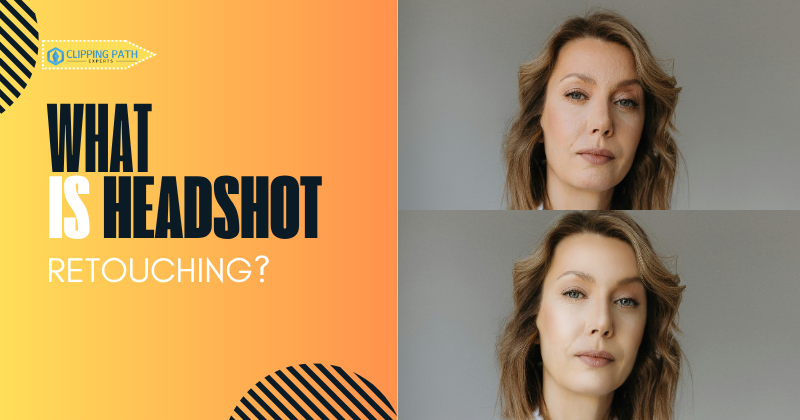
Before-and-after headshots demonstrate the tangible impact of professional retouching on a RAW image. They help clients understand the value of subtle enhancements versus advanced edits.
Visual Proof:
- RAW Image → Professional Headshot: Shows how lighting, skin, and background improvements create a polished, confident appearance.
- Subtle vs Dramatic Changes:
Standard Headshot Retouch
IIdeal for actors, models, and professionals who want a clean, authentic look. This image shows subtle skin smoothing, blemish removal, eyebrow cleanup, and balanced lighting—perfect for LinkedIn or portfolios.
Advanced Headshot Editing
Designed for editorial or commercial use, this retouch includes advanced skin work, color grading, makeup enhancement, and flyaway hair correction. The result: polished, professional, and ready for print.
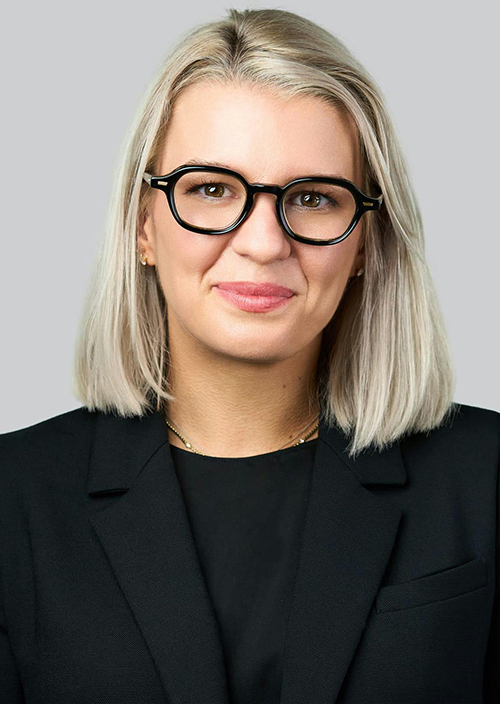

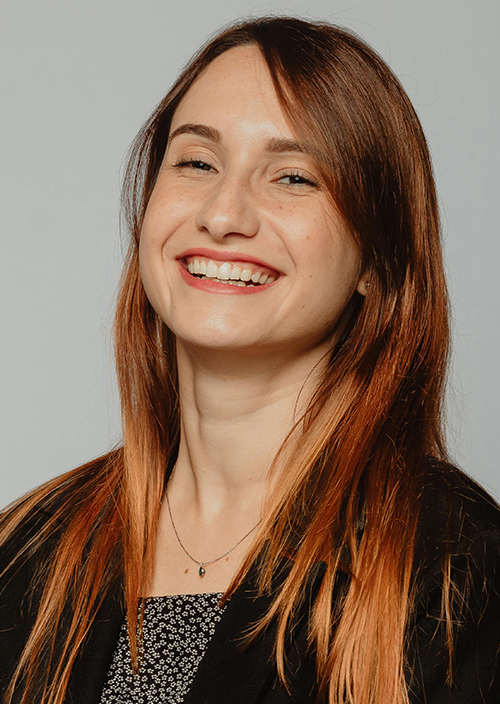
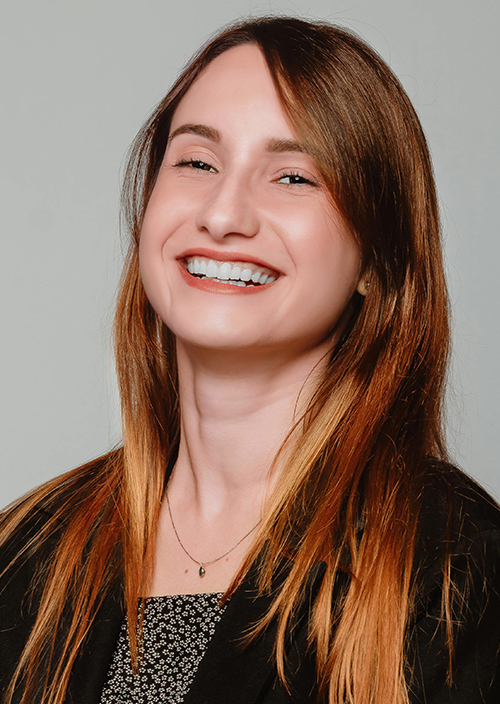
This visual breakdown shows what headshot retouching can do. It doesn’t change who you are—it enhances what’s already there. A professional portrait enhancement gives you a cleaner, sharper, and more confident version of your original image.
Whether for LinkedIn, your company bio, or an acting portfolio, this is where headshot editing truly delivers. These comparisons give clients confidence in choosing the right retouching level for their goals.
(See transformations in Before and After Headshot Retouching)
Headshot Retouching vs. Overediting
Many people confuse what is headshot retouching with heavy photo manipulation, but they’re very different. Retouching focuses on enhancing your natural features, not changing them.
Headshot Retouching:
- Keeps facial structure untouched
- Smooths skin while retaining texture
- Removes minor blemishes and distractions
- Adjusts lighting, contrast, and sharpness
- Maintains a natural and realistic look
Overediting:
- Alters face shape or size
- Over-smooths skin until it looks plastic
- Adds unrealistic filters or heavy effects
- Misrepresents how you actually look
The goal of professional headshot editing is authenticity. You want to appear confident, not artificial. If you’re asking what is headshot retouching supposed to achieve, the answer is simple: it brings out your best version, not a fake one.
Who Needs Headshot Retouching?
If you want to make a strong impression with your photo, you need headshot retouching. It’s not just for actors or models—it’s for anyone who uses a professional image online.
Here’s who benefits most:
- Job Seekers: A clean, polished photo on your resume or LinkedIn profile builds trust fast.
- Business Professionals: CEOs, managers, and consultants use retouched corporate branding images to present authority.
- Entrepreneurs & Coaches: Your personal brand depends on how you show up visually.
- Actors & Creatives: Your talent portfolio needs subtle, high-quality edits that keep casting agents focused on you.
- Speakers & Influencers: A crisp image helps you stand out on social media, websites, and event listings.
Why Do Actors Need Retouched Headshots?
Actors rely on headshots to make strong first impressions with casting directors. A polished image highlights facial expressions, personality, and confidence while maintaining a natural look.
Key Benefits:
- Casting Impact: Subtle retouching ensures directors focus on talent, not distractions.
- Portfolio Consistency: Uniform quality across all images strengthens professional presentation.
- Natural Enhancement: Maintains authenticity while refining skin, lighting, and background.
(Discover more in Why Actors Need Retouched Headshots)
Should You Use Retouched Headshots on Business Cards?
Professional headshots on business cards enhance visual branding and leave a memorable impression. They convey trustworthiness and credibility across industries.
Key Benefits:
- Industry Impact: Common in real estate, law, consulting, and coaching where personal image matters.
- Trust & Memorability: A polished photo helps clients remember you and builds instant confidence.
- Consistency: Aligns printed materials with your online professional image.
(Explore more in Retouched Headshots for Business Cards)
DIY Apps vs. Professional Retouching
Many people try to edit their headshots using mobile apps or filters. While some tools offer quick fixes, they can’t replace the precision of professional work.
DIY Apps (FaceTune, Canva, Lightroom Mobile)
- Use one-click filters or sliders
- Often blur skin too much
- Struggle with detailed facial touch-ups
- Lack control over lighting, color, and texture
- May leave the photo looking fake or generic
Professional Retouching
- Uses manual editing in Photoshop or Lightroom
- Focuses on digital image retouch with subtlety
- Balances color, tone, and contrast accurately
- Removes flaws without over-editing
- Ensures you still look like yourself—just sharper and more polished
So, what is headshot retouching really about? It’s not about filters—it’s about refinement. A skilled retoucher brings out the best in your image without relying on presets or shortcuts.
If your headshot truly matters, trust a professional.
Choosing the Right Headshot Retouching Service
Now that you know what is headshot retouching and why it matters, the next step is choosing a service that gets it right.Look for these key qualities:
✅ What to Expect from a Professional Service:
- Natural Results: Edits should enhance your look, not alter it.
- High-End Skin Editing: Retouches should be clean, not plastic-looking.
- Fast Turnaround: You shouldn’t wait days to get your photos back.
- Secure Delivery: Your images should be handled with confidentiality.
- Affordable Pricing: Top quality shouldn’t mean overpriced.
- Trial Option: A free test edit shows their quality before you commit.
At Clipping Path Experts, we deliver subtle, precise headshot editing trusted by professionals worldwide. Whether you’re updating your LinkedIn photo or refreshing your portfolio, our expert team ensures you look your best—naturally.
👉 Try our service with 10 free retouched images today.
Explore Our Headshot Retouching Service »
Frequently Asked Questions (FAQ)
What is headshot retouching used for?
Headshot retouching is used to enhance your facial image for professional platforms like LinkedIn, resumes, portfolios, or websites. It improves skin tone, lighting, and overall presentation while keeping your natural features intact.
Is headshot retouching necessary?
Yes—especially if your image appears in client-facing or career-related places. A well-retouched headshot creates a strong first impression and builds trust.
Will my photo look fake after retouching?
Not with professional editing. The goal is subtle refinement, not heavy filters. You’ll still look like yourself—just more confident and polished.
How long does professional headshot retouching take?
Most services deliver within 24–48 hours. Express options are often available for urgent needs.
Can I retouch my headshot using apps?
You can, but results often look overdone. Apps lack precision and may reduce photo quality. For clean, natural results, trust a professional.
Conclusion
Now that you understand what is headshot retouching, it’s clear why professionals across industries rely on it. It’s not about changing your face—it’s about removing distractions, enhancing clarity, and presenting the most confident version of yourself.
Whether you’re job hunting, building your brand, or updating your online presence, a high-quality retouched headshot can make all the difference.
✅ Ready to try it for yourself?
Get started with 10 free image retouches and see the results firsthand.
👉 Visit our Headshot Retouching Service »
For deeper learning, explore our guides:
- Types of Headshot Retouching
- Benefits of Retouched Headshots
- Headshot Retouching vs Portrait Retouching
- Corporate Headshot Retouching Importance
- Retouching for LinkedIn Headshots
- Headshot Retouching Workflow
- High-End vs Basic Headshot Retouching
- Before and After Headshot Retouching
- Why Actors Need Retouched Headshots
- Retouched Headshots for Business Cards